Loading
Get Rm0013: Bloodborne Exposure Incident Report - Lps.org - Lps
How it works
-

Open form follow the instructions
-

Easily sign the form with your finger
-

Send filled & signed form or save
How to fill out the RM0013: Bloodborne Exposure Incident Report - LPS.org - Lps online
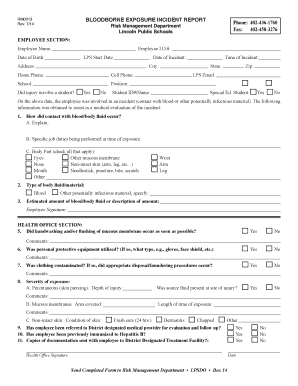
This guide provides a comprehensive overview of how to accurately complete the RM0013: Bloodborne Exposure Incident Report. It aims to assist users in understanding each section and field of the form, ensuring that incidents related to bloodborne exposures are reported correctly and efficiently.
Follow the steps to successfully complete the RM0013 form.
- Use the ‘Get Form’ button to access the RM0013: Bloodborne Exposure Incident Report form and open it in a digital editor.
- Begin by filling out the 'Employee Section' including your name, employee ID number, date of birth, start date at LPS, and contact information. Be thorough and accurate with these details.
- Document the date and time of the incident in the designated fields to provide a clear timeline of events.
- Indicate whether the incident involved a student by selecting 'Yes' or 'No' in the appropriate checkbox.
- In the section regarding contact with blood or other potentially infectious materials, provide a clear explanation of how the exposure occurred and the specific job duties being performed when the incident happened.
- Check all applicable body parts that were affected by the incident, ensuring to include any cuts or contact with bodily fluids.
- Select the type of bodily fluid or material involved in the incident, such as blood or any other potentially infectious material. Provide an estimate of the amount encountered.
- Sign where indicated to confirm that the information provided is accurate and complete.
- In the 'Health Office Section', answer questions regarding immediate actions taken post-exposure, such as whether handwashing occurred and if personal protective equipment was used.
- Detail whether clothing was contaminated and if proper disposal or laundering procedures were followed.
- Note the severity of the exposure by completing any relevant sections regarding the condition of the skin and length of exposure.
- Complete the remaining fields, including referrals to healthcare providers, immunization status, and confirm if documentation was sent with the employee.
Complete your documents online today to ensure timely reporting of incidents.
Industry-leading security and compliance
US Legal Forms protects your data by complying with industry-specific security standards.
-
In businnes since 199725+ years providing professional legal documents.
-
Accredited businessGuarantees that a business meets BBB accreditation standards in the US and Canada.
-
Secured by BraintreeValidated Level 1 PCI DSS compliant payment gateway that accepts most major credit and debit card brands from across the globe.