Loading
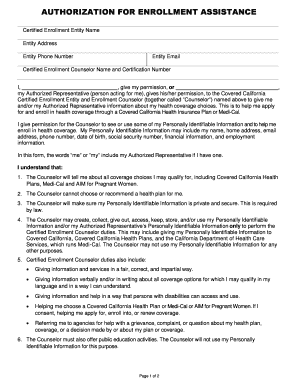
Get Authorization For Enrollment Assistance Form
How it works
-

Open form follow the instructions
-

Easily sign the form with your finger
-

Send filled & signed form or save
How to fill out the Authorization For Enrollment Assistance Form online
This guide provides clear, step-by-step instructions for completing the Authorization For Enrollment Assistance Form online. By following these directions, users can efficiently navigate the form to grant permission for enrollment assistance.
Follow the steps to complete the Authorization For Enrollment Assistance Form online.
- Click ‘Get Form’ button to obtain the form and open it in your preferred online editor.
- Enter the name of the Certified Enrollment Entity in the designated field. This information identifies the organization assisting you with the enrollment process.
- Input the address of the Certified Enrollment Entity, including the street address, city, state, and zip code, ensuring accuracy for proper correspondence.
- Fill in the phone number and email address of the Certified Enrollment Entity. This allows for effective communication regarding your enrollment.
- Provide the name and certification number of the Certified Enrollment Counselor assisting you. This helps establish your Counselor's credentials.
- In the area marked for permission, specify your name or that of your Authorized Representative, indicating who is granting consent for information sharing.
- Review the list of health coverage choices and understand that you or your Authorized Representative will receive information regarding options such as Covered California Health Plans, Medi-Cal, and AIM for Pregnant Women.
- Read through the confidentiality clauses to acknowledge the privacy of your Personally Identifiable Information and the Counselor's responsibilities.
- Sign and date the form in the specified areas. Ensure that you understand the implications of your signature and the agreement you're entering into.
- After completing the form, you can save changes, download the completed form, print it for your records, or share it with your Authorized Representative or the enrollment entity.
Complete your Authorization For Enrollment Assistance Form online today for assistance with your health coverage options.
The Certified Enrollment Entity is responsible for maintaining a record of the Authorization Form for six (6) years.