Loading
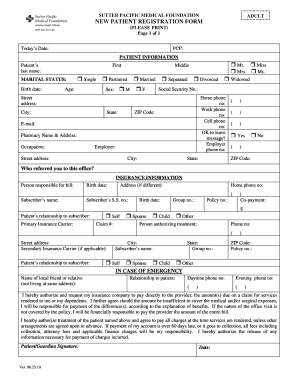
Get New Patient Registration Form - Sutter Pacific Medical Foundation
How it works
-

Open form follow the instructions
-

Easily sign the form with your finger
-

Send filled & signed form or save
How to fill out the New Patient Registration Form - Sutter Pacific Medical Foundation online
Completing the New Patient Registration Form for the Sutter Pacific Medical Foundation is an important step in receiving healthcare services. This guide provides you with clear, step-by-step instructions on how to accurately fill out the form online, ensuring that all necessary information is submitted effectively.
Follow the steps to complete the online form.
- Click ‘Get Form’ button to obtain the form and open it in the editor.
- Begin by entering today's date in the designated field at the top of the form.
- Fill in your primary care physician's name in the 'PCP' section. This ensures that your medical history can be attributed correctly.
- In the patient information section, provide your last name, first name, and middle name as applicable. Ensure all fields are accurately filled.
- Indicate your marital status by selecting one of the available options (e.g., single, partnered, married, separated, divorced, widowed).
- Enter your birth date and sex in the respective fields. Ensure the use of correct formats to avoid processing errors.
- Fill in your address, including street, city, state, and ZIP code. It is important to provide accurate information to avoid delays in communication.
- Provide your home, work, and cell phone numbers. Indicate if it is acceptable to leave a message on your phone.
- Next, document your email address and specify your pharmacy's name and address.
- State your occupation and the name of your employer, along with the employer's address, if applicable.
- Indicate who referred you to this office, as this can be helpful for practice records.
- In the insurance information section, provide details about the person responsible for the bill, including their birth date, address, and subscriber information.
- Complete the primary insurance carrier details. Include the policy number, group number, and relation to the subscriber.
- If applicable, fill out the secondary insurance carrier information using the same procedures as the primary carrier.
- In case of emergency, provide the name of a local friend or relative, their relationship to you, and their contact numbers.
- Review the authorizations stated at the bottom of the form before signing or obtaining a guardian's signature if required.
- After completing the form, ensure all fields are filled correctly. Save any changes made, and you can choose to download, print, or share the completed form as necessary.
Complete your New Patient Registration Form online today to streamline your healthcare experience.
To make your primary care appointment, you can call your local clinic or login to My Health Online to request an appointment online. If you would like a same-day appointment, call early in the day when we are better able to meet your needs.
Industry-leading security and compliance
US Legal Forms protects your data by complying with industry-specific security standards.
-
In businnes since 199725+ years providing professional legal documents.
-
Accredited businessGuarantees that a business meets BBB accreditation standards in the US and Canada.
-
Secured by BraintreeValidated Level 1 PCI DSS compliant payment gateway that accepts most major credit and debit card brands from across the globe.