Loading
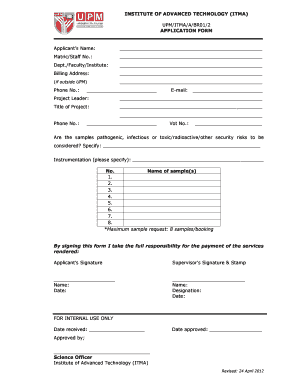
Get Upm/itma/a/br01/2 Application Form Applicant's ... - Wordpress
How it works
-

Open form follow the instructions
-

Easily sign the form with your finger
-

Send filled & signed form or save
How to fill out the UPM/ITMA/A/BR01/2 APPLICATION FORM Applicant’s online
Filling out the UPM/ITMA/A/BR01/2 APPLICATION FORM is an essential step for applicants seeking to request services from the Institute of Advanced Technology. This guide provides clear and concise instructions to assist you in completing the form accurately and efficiently.
Follow the steps to successfully complete the application form.
- Press the ‘Get Form’ button to obtain the form and open it in your preferred online editor.
- Enter your full name in the 'Applicant’s Name' field. Ensure your name is spelled correctly to avoid any discrepancies.
- Provide your Matric/Staff No. in the designated field to facilitate proper identification within the system.
- Indicate your department, faculty, or institute in the appropriate section, ensuring accuracy for effective processing.
- Fill in your billing address if you are located outside UPM. This information is crucial for any invoicing related to the services requested.
- Input your phone number and email address, ensuring these are accurate so that you can receive necessary communications regarding your application.
- Specify the name of the project leader and include their contact number, facilitating any follow-up discussions regarding the project.
- Enter the title of your project. This should be concise yet descriptive enough to convey the purpose of your application.
- Indicate whether the samples you are requesting are pathogenic, infectious, toxic, radioactive, or present any other security risks. Provide details if applicable.
- List the samples you are requesting in the designated section, with a maximum of eight samples per booking.
- By signing the form, you acknowledge full responsibility for the payment of the services rendered. Ensure to provide your signature.
- Your supervisor must also sign and stamp the form, providing their name, designation, and date, to validate the request.
- For internal processing, the date received and approved will be noted. These are for administrative purposes and do not require your input.
- Once all fields are filled out, save your changes. You may also choose to download, print, or share the completed form as needed.
Complete your application form online today for a smooth processing experience.
Industry-leading security and compliance
US Legal Forms protects your data by complying with industry-specific security standards.
-
In businnes since 199725+ years providing professional legal documents.
-
Accredited businessGuarantees that a business meets BBB accreditation standards in the US and Canada.
-
Secured by BraintreeValidated Level 1 PCI DSS compliant payment gateway that accepts most major credit and debit card brands from across the globe.