Loading
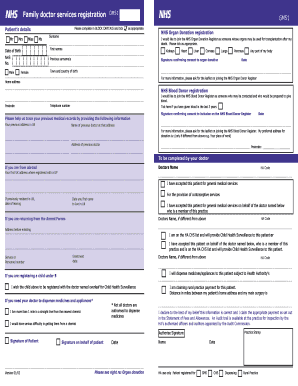
Get Family Doctor Services Registration Filled Form
How it works
-

Open form follow the instructions
-

Easily sign the form with your finger
-

Send filled & signed form or save
How to fill out the Family Doctor Services Registration Filled Form online
Filling out the Family Doctor Services Registration Filled Form online is a straightforward process. This comprehensive guide will help you complete each section accurately and efficiently, ensuring you provide all necessary details for your registration.
Follow the steps to complete the form successfully.
- Press the ‘Get Form’ button to access and display the Family Doctor Services Registration Filled Form in your preferred online environment.
- Begin by providing your patient details in block capitals. Indicate your title by ticking the appropriate box (Mr, Mrs, Miss, Ms, etc.). Fill in your surname and first names accurately.
- Enter your date of birth in the specified format. Include your NHS number if you have one, and list any previous surnames, if applicable.
- Specify your town and country of birth, and indicate your gender by selecting either female or male.
- Complete your home address, ensuring to include the full postcode and telephone number.
- If you wish to join the NHS Organ Donation Register, tick the relevant options for the organs you would like to donate. Provide your signature to confirm consent and date it.
- For NHS Blood Donor registration, tick the box if you have donated blood in the last three years, and sign to confirm your consent, along with the date.
- To assist in tracing previous medical records, provide your previous address in the UK, along with the name and address of your previous doctor.
- If you are registering a child under five, complete the section requesting registration with the doctor for Child Health Surveillance.
- If applicable, indicate your distance from the nearest chemist and state any serious difficulties in obtaining medicines.
- Finally, review all the information you provided for accuracy, sign the form, and include the date. Your doctor's details should be completed by the doctor accepting you as a patient.
- Once all sections are filled out correctly, save any changes, and download or print the form, if needed. You may also share it electronically.
Complete your Family Doctor Services Registration Filled Form online today to ensure your healthcare needs are met.
Getting your NHS Number When you register with a GP practice you'll receive a letter with your NHS Number. If you are not able to find your NHS Number, contact your GP practice for help. It is not possible to find your NHS Number online.