Loading
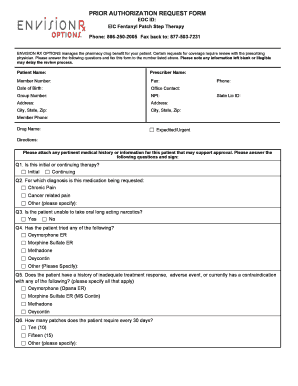
Get Download Step Therapy Request Form - - Envisionrxplus
How it works
-

Open form follow the instructions
-

Easily sign the form with your finger
-

Send filled & signed form or save
How to fill out the Download Step Therapy Request Form - - EnvisionRxPlus online
This guide provides a step-by-step approach to completing the Download Step Therapy Request Form - - EnvisionRxPlus online. By following these instructions, users can ensure that their requests for coverage are submitted accurately and efficiently.
Follow the steps to successfully complete the form.
- Click ‘Get Form’ button to access and open the Download Step Therapy Request Form - - EnvisionRxPlus in your preferred editor.
- Begin by filling out the 'Patient Name' section. Provide the full name of the person for whom the request is being submitted as this identifies the subject of the treatment.
- Next, complete the 'Prescriber Name' field. This should include the name of the healthcare provider who is prescribing the therapy.
- Enter the 'Member Number,' which is essential for identifying the patient in the health plan's system.
- Fill out the 'Date of Birth' section with the patient's birthdate to verify their age and eligibility.
- Provide the 'Office Contact' information for easy communication regarding the request, including a name and direct phone number.
- Complete the 'Group Number' and 'NPI' fields as they are necessary for administrative purposes within the health insurance framework.
- Document the 'Address,' 'City, State, Zip' of both the patient and the prescriber for complete identification.
- Indicate whether the request is 'Expedited/Urgent' by checking the appropriate box if any urgent consideration is needed for the patient's therapy.
- Attach any relevant medical history or documentation that could support the request for the prescribed therapy.
- Answer the question regarding whether the therapy request is for initial or continuing treatment by selecting the appropriate option.
- Specify the diagnosis for which the medication is being requested in the designated section, ensuring to check all that apply.
- Respond to the question about the patient's ability to take oral long-acting narcotics accordingly.
- List any treatments the patient has previously tried and indicate if there was inadequate treatment response or adverse events.
- Specify the required number of patches every 30 days in accordance with the patient's medical needs.
- If the patient requires more than the standard quantity of patches, provide a rationale in the space provided to justify the exception.
- Sign the form at the designated place by the prescribing physician to validate the request.
- After completing all sections, save any changes made to the form. You may then download, print, or share the completed request as needed.
Complete your documents online to ensure timely submissions and approvals.
Typically, within 5-10 business days of receiving the prior authorization request, your insurance company will either: Approve your request. Deny your request.