Loading
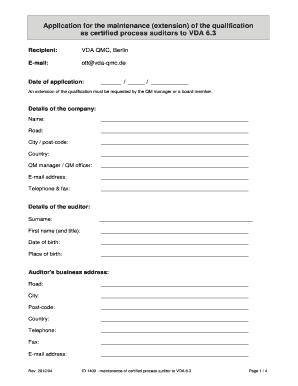
Get Vda Online Registration
How it works
-

Open form follow the instructions
-

Easily sign the form with your finger
-

Send filled & signed form or save
How to fill out the Vda Online Registration online
The Vda Online Registration is essential for requesting an extension of qualification for certified process auditors. This guide will walk you through each section of the form, ensuring a smooth and accurate completion.
Follow the steps to complete the Vda Online Registration form effectively.
- Press the ‘Get Form’ button to access the registration form and open it for editing.
- Fill in the recipient information, including the title 'VDA QMC, Berlin' and the email address 'ott@vda-qmc.de'.
- Enter the date of your application, ensuring you format it correctly as 'day/month/year'.
- In the 'Details of the company' section, complete the fields for the company name, road, city, postal code, country, QM manager or officer, email address, and telephone and fax numbers.
- Next, in the 'Details of the auditor' section, provide the auditor's surname, first name and title, date and place of birth, business address, and contact details.
- For evidence of the auditor experience, ensure that you document at least five external process audits. Fill in the audit details in the provided table on page four and secure a confirmation signature from the QM manager.
- Provide evidence of further instruction in the QM field by documenting any relevant training activities or symposium participation.
- Confirm the accuracy of the information by signing and entering the date, your name, and title in the designated section.
- Complete the invoicing address section thoroughly and obtain the necessary signatures from a board member or the QM manager, including the organization stamp.
- Review all sections for completeness and accuracy before finalizing your application.
- Once the form is completed, save changes, and then download or print a copy for your records.
Complete your Vda Online Registration today to ensure your qualifications remain up to date.
Additional Troubleshooting Steps On the VDA: Restart the Citrix Desktop service. ... Ensure Anti-virus exclusions are configured correctly: Endpoint Security, Antivirus and Antimalware Best Practices. Check DNS settings CTX235416. Review Troubleshooting Tab in Studio: Verify the VDA is powered on.
Industry-leading security and compliance
US Legal Forms protects your data by complying with industry-specific security standards.
-
In businnes since 199725+ years providing professional legal documents.
-
Accredited businessGuarantees that a business meets BBB accreditation standards in the US and Canada.
-
Secured by BraintreeValidated Level 1 PCI DSS compliant payment gateway that accepts most major credit and debit card brands from across the globe.