Loading
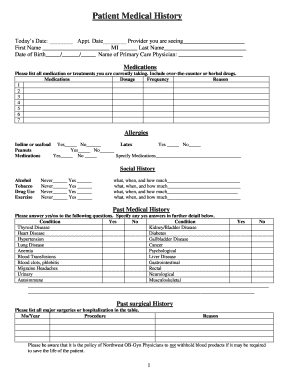
Get Web Patient Medical History Form - Northwest Ob-gyn
How it works
-

Open form follow the instructions
-

Easily sign the form with your finger
-

Send filled & signed form or save
How to fill out the Web Patient Medical History Form - Northwest OB-GYN online
Filling out the Web Patient Medical History Form is an essential step for your upcoming appointment with Northwest OB-GYN. This guide provides clear, step-by-step instructions to help you complete the form accurately and efficiently.
Follow the steps to complete the medical history form online.
- Click ‘Get Form’ button to access the form and open it in your preferred online editor.
- Begin by entering today's date and the appointment date in the designated fields. Add the name of the provider you will be seeing, followed by your first name, middle initial, and last name.
- Provide your date of birth and the name of your primary care physician in the specified fields.
- In the medications section, list all medications or treatments you are currently taking, including over-the-counter and herbal supplements. For each entry, fill in the dosage, frequency, and reason.
- Answer the allergy section by indicating 'Yes' or 'No' for each item listed—iodine or seafood, latex, peanuts, and medications. If you have allergies to specific medications, please specify them.
- Provide details of your social history, including frequency of alcohol consumption, tobacco use, and any drug use. Fill in the necessary information on what substances you use, when you use them, and how much.
- In the past medical history section, respond 'Yes' or 'No' to each condition listed. If you answer 'Yes' to any of the conditions, elaborate on them in the space provided.
- Document your past surgical history by listing all major surgeries or hospitalizations, including the month/year, procedure name, and reason for each.
- Fill out the family medical history section, indicating any genetic diseases in your family by checking the relevant boxes and providing details about medical problems faced by family members.
- Complete the obstetrical history section by stating the number of pregnancies you have had and listing the outcome of each pregnancy along with relevant details.
- In the gynecologic history section, provide information about your menstrual cycle, including your age at menarche and details about your last period, along with any relevant symptoms or conditions.
- Confirm that the information provided is accurate by signing the form where indicated, including the date of completion.
- Once you have filled in all required fields, you can save your changes, download the form for your records, print it for your appointment, or share it as needed.
Complete your medical history form online to ensure a smooth experience at your upcoming appointment.
Industry-leading security and compliance
US Legal Forms protects your data by complying with industry-specific security standards.
-
In businnes since 199725+ years providing professional legal documents.
-
Accredited businessGuarantees that a business meets BBB accreditation standards in the US and Canada.
-
Secured by BraintreeValidated Level 1 PCI DSS compliant payment gateway that accepts most major credit and debit card brands from across the globe.