Loading
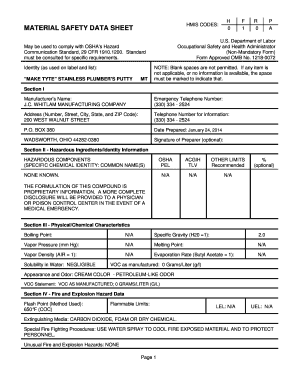
Get S:\msds\mt - Make-tyte.wpd - J.c. Whitlam
How it works
-

Open form follow the instructions
-

Easily sign the form with your finger
-

Send filled & signed form or save
How to fill out the S:\MSDS\MT - Make-Tyte.wpd - J.C. Whitlam online
Filling out the S:\MSDS\MT - Make-Tyte.wpd - J.C. Whitlam form is essential for ensuring safety in handling the substance. This guide will walk you through each step of the process, making it accessible for everyone, regardless of their experience with such forms.
Follow the steps to complete the form accurately and efficiently.
- Click the ‘Get Form’ button to obtain the form and open it in your editor. This will allow you to access the document you need to fill out.
- Begin with Section I, which requires you to fill in the manufacturer’s name, emergency telephone number, and address. Ensure all fields are completed; if information is not applicable, mark the space clearly.
- In Section II, list any hazardous ingredients or identity information if applicable. In cases where specific components are not available, note that the information is proprietary.
- Section III covers physical and chemical characteristics. Input values for boiling point, specific gravity, and the appearance and odor of the product, using 'N/A' where necessary.
- Proceed to Section IV to document fire and explosion hazard data. Fill in the flash point and extinguishing media, and state any unusual fire hazards.
- In Section V, indicate stability information. Specify any conditions to avoid and the materials that should not come into contact with the product.
- Fill out Section VI regarding health hazard data. Provide information about potential routes of entry, health hazards, and emergency procedures.
- Section VII requires precautions for safe handling and use. Offer guidance on handling spills, disposal methods, and storage precautions.
- Finally, in Section VIII, specify control measures, such as protective equipment recommended for safe handling of the product.
- Once all sections are completed, review the entire form for accuracy. You can then save your changes, download, print, or share the document as necessary.
Complete your documents online to ensure safety and compliance with regulations.
Industry-leading security and compliance
US Legal Forms protects your data by complying with industry-specific security standards.
-
In businnes since 199725+ years providing professional legal documents.
-
Accredited businessGuarantees that a business meets BBB accreditation standards in the US and Canada.
-
Secured by BraintreeValidated Level 1 PCI DSS compliant payment gateway that accepts most major credit and debit card brands from across the globe.