Loading
Get Provider Enrollment Form - Bluecross Blueshield Of Western New ...
How it works
-

Open form follow the instructions
-

Easily sign the form with your finger
-

Send filled & signed form or save
How to fill out the Provider Enrollment Form - BlueCross BlueShield of Western New York online
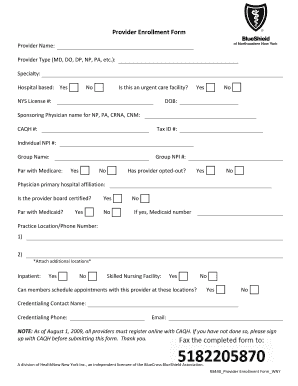
Completing the Provider Enrollment Form for BlueCross BlueShield of Western New York online is a crucial task for providers seeking to enroll with the insurance provider. This guide will take you through the sections of the form, ensuring that you provide all necessary information accurately and efficiently.
Follow the steps to complete your enrollment form successfully.
- Click ‘Get Form’ button to obtain the form and open it in your preferred online editor.
- In the section labeled ‘Provider Name’, enter your full name as it appears on your license. This is crucial for proper identification.
- Select your provider type from the options available, such as MD, DO, DP, NP, or PA.
- Specify your specialty to provide more detailed information about your practice area.
- Indicate whether your practice is hospital-based by selecting 'Yes' or 'No'.
- If applicable, check if you are an urgent care facility by selecting 'Yes' or 'No'.
- Enter your New York State license number in the field provided.
- Provide your date of birth (DOB) for verification purposes.
- If you are a Nurse Practitioner, Physician Assistant, or similar, include the name of your sponsoring physician.
- Enter your CAQH number to confirm your registration status.
- Fill in your Tax ID number for billing and identification.
- Input your Individual NPI number to associate your enrollment with the correct identifier.
- Provide your group name, if applicable, to link your practice under a larger entity.
- Confirm if you are a participating provider with Medicare by selecting 'Yes' or 'No'. If yes, provide your Group NPI number.
- State whether the provider has opted out of Medicare services.
- Document your primary hospital affiliation in the designated area.
- Indicate whether the provider is board certified by selecting 'Yes' or 'No'.
- Confirm Medicaid participation and if applicable, provide your Medicaid number.
- Enter your practice location and phone number. If you have multiple locations, be sure to document those as well.
- Select whether members can schedule appointments at the listed locations by answering 'Yes' or 'No'.
- List the credentialing contact's name and phone number to direct inquiries appropriately.
- Lastly, fill in the email address for the credentialing contact.
- Once all information is accurately completed and reviewed, save changes, and consider printing or sharing the form as needed.
Complete your Provider Enrollment Form online today to ensure a smooth enrollment process.
Request a Call to talk to a Highmark licensed representative about our non-Medicare plans or to enroll. Not a Highmark member? Call 1-866-488-7469 TTY: 711 (Monday - Sunday 8:00am to 8:00pm EST) to talk to a representative who can answer questions about our plans.
Industry-leading security and compliance
US Legal Forms protects your data by complying with industry-specific security standards.
-
In businnes since 199725+ years providing professional legal documents.
-
Accredited businessGuarantees that a business meets BBB accreditation standards in the US and Canada.
-
Secured by BraintreeValidated Level 1 PCI DSS compliant payment gateway that accepts most major credit and debit card brands from across the globe.