We use cookies to improve security, personalize the user experience, enhance our marketing activities (including cooperating with our marketing partners) and for other business use.
Click "here" to read our Cookie Policy. By clicking "Accept" you agree to the use of cookies. Read less
Read more
Accept
Loading
Form preview
  • US Legal Forms
  • Form Library
  • More Forms
  • More Uncategorized Forms
  • Engineering Change Order Fomrs

Get Engineering Change Order Fomrs

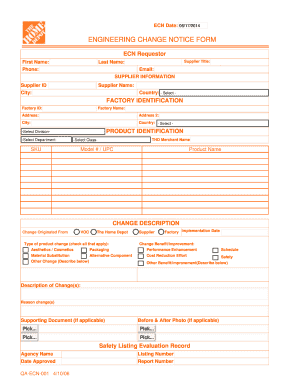
ECN Date: 06/17/2014 ECN ID: ENGINEERING CHANGE NOTICE FORM ECN Requestor First Name: Phone: Supplier Title: Last Name: Email: SUPPLIER INFORMATION Supplier ID Supplier Name: City: Country: - Select.

How it works

  1. Open form

    Open form follow the instructions

  2. Easily sign form

    Easily sign the form with your finger

  3. Share form

    Send filled & signed form or save

How to fill out the Engineering Change Order Forms online

This guide provides clear instructions on how to complete the Engineering Change Order Forms online, ensuring a smooth and efficient submission process. Whether you are familiar with electronic forms or a first-time user, these steps will help you navigate through each section effectively.

Follow the steps to successfully complete the form.

  1. Click the ‘Get Form’ button to obtain the form and open it in the editor.
  2. Begin by filling out the ECN requestor section. Provide your first name, last name, phone number, email, and supplier title in the appropriate fields.
  3. Next, enter the supplier information. Fill in the supplier ID and name, along with the city and select the country from the dropdown menu.
  4. Proceed to the factory identification section. Include the factory ID, factory name, and relevant address information, making sure to fill in both address lines if necessary.
  5. In the product identification area, select the appropriate division and department. Then, enter details such as the THD merchant name, select the product class, SKU, model number or UPC, and product name.
  6. Specify the origin of the change. Select 'VOC' and 'The Home Depot,' then check all applicable product change types, such as aesthetics/cosmetics, material substitution, packaging, or alternative components. If applicable, describe any other changes.
  7. Describe the change(s) you are proposing in the designated field. Be sure to include the reason for the changes and any anticipated benefits, such as performance enhancement, cost reduction, schedule improvement, or safety.
  8. If there are supporting documents or photographs for your change, ensure to upload them in the appropriate fields.
  9. Complete the safety listing evaluation record by providing agency name, listing number, and date approved, along with the report number, if applicable.
  10. Before finalizing, click the options to save the form to your desktop, reset the form if needed, or submit it for processing.

Start filling out your Engineering Change Order Forms online today for a streamlined submission experience.

Get form

Experience a faster way to fill out and sign forms on the web. Access the most extensive library of templates available.
Get form

Related content

Change Order | Department of Environmental...
Jump to Change Order Forms and Publications — Change Order Standard Operation Procedure...
Learn more
Engineering Change Request Form Template - Free...
ColoradoEngineering Change Notice template (Free + editable ECN FREE. Engineering Change...
Learn more
Engineering change order - Wikipedia
An engineering change order (ECO), also called an engineering change note, engineering...
Learn more

Related links form

Bibliotherapy In Seventh-day Adventist Education Using The - Ict Aiias Kdigitalpro US EPA - Standard Operating Procedure For Disinfectant Product Preparation And Sampling Procedures CITY OF BERKELEY CLOSING BUSINESS DECLARATION - Cityofberkeley

Questions & Answers

Get answers to your most pressing questions about US Legal Forms API.

Contact support

If the agreement said that any changes to the agreement require a written amendment signed by both parties and you wanted to use change orders, the agreement should say that change orders signed by both parties constitute an amendment to the agreement.

Pick your order form tool. Determine your order form fields. Set up your payment processing system. Customize and brand your order form. Create a confirmation page to display after customers place an order.

Engineering Change Orders (ECOs): Overview. An ECO or Engineering Change Order is used to implement a change for an existing object or to release a new object. The ECO allows you to document the reason for the change and identify the BOM Items and Document objects that are being changed or released.

A Change Order Request log is simply a running list of all Change Order Requests sent from a contractor to their customer. (Subcontractor to General Contractor, GC to Owner, etc.). ... It's also the only way General Contractors can be certain they have accounted for every single cost submitted by their Subcontractors.

What are engineering change orders? One way to improve your cost, quality, or marketing advantage is by implementing an engineering change order for a particular product. In it's simplest form, an engineering change order is a modification that will have an effect on a manufactured product or manufacturing process.

Manufacturing changes should be documented so that problems can be addressed efficiently. ... Manufacturing change order (MCO) A change order describing modifications to the manufacturing process or equipment.

Job name, address and phone number. Owner's name. A complete description of new work to be performed. Total price for materials and labor to complete the change. Revised date of completion due to the change order. Signatures of the company representative. Signatures of the homeowners.

What is the Difference between an ECO and an ECR? An ECR requests a change to existing BOM Items or Document objects. An ECO implements the change request. An ECO can also be used to release new BOM Items and Document objects for production.

Job name, address and phone number. Owner's name. A complete description of new work to be performed. Total price for materials and labor to complete the change. Revised date of completion due to the change order. Signatures of the company representative. Signatures of the homeowners.

Get This Form Now!

Use professional pre-built templates to fill in and sign documents online faster. Get access to thousands of forms.
Get form
If you believe that this page should be taken down, please follow our DMCA take down processhere.

Industry-leading security and compliance

US Legal Forms protects your data by complying with industry-specific security standards.
  • In businnes since 1997
    25+ years providing professional legal documents.
  • Accredited business
    Guarantees that a business meets BBB accreditation standards in the US and Canada.
  • Secured by Braintree
    Validated Level 1 PCI DSS compliant payment gateway that accepts most major credit and debit card brands from across the globe.
Get Engineering Change Order Fomrs
Get form
Form Packages
Adoption
Bankruptcy
Contractors
Divorce
Home Sales
Employment
Identity Theft
Incorporation
Landlord Tenant
Living Trust
Name Change
Personal Planning
Small Business
Wills & Estates
Packages A-Z
Form Categories
Affidavits
Bankruptcy
Bill of Sale
Corporate - LLC
Divorce
Employment
Identity Theft
Internet Technology
Landlord Tenant
Living Wills
Name Change
Power of Attorney
Real Estate
Small Estates
Wills
All Forms
Forms A-Z
Form Library
Customer Service
Terms of Service
Privacy Notice
Legal Hub
Content Takedown Policy
Bug Bounty Program
About Us
Help Portal
Legal Resources
Blog
Affiliates
Contact Us
Delete My Account
Site Map
Industries
Forms in Spanish
Localized Forms
State-specific Forms
Forms Kit
Legal Guides
Real Estate Handbook
All Guides
Prepared for You
Notarize
Incorporation services
Our Customers
For Consumers
For Small Business
For Attorneys
Our Sites
US Legal Forms
USLegal
FormsPass
pdfFiller
signNow
airSlate WorkFlow
DocHub
Instapage
Social Media
Call us now toll free:
+1 833 426 79 33
As seen in:
  • USA Today logo picture
  • CBC News logo picture
  • LA Times logo picture
  • The Washington Post logo picture
  • AP logo picture
  • Forbes logo picture
© Copyright 1997-2025
airSlate Legal Forms, Inc.
3720 Flowood Dr, Flowood, Mississippi 39232
Form Packages
Adoption
Bankruptcy
Contractors
Divorce
Home Sales
Employment
Identity Theft
Incorporation
Landlord Tenant
Living Trust
Name Change
Personal Planning
Small Business
Wills & Estates
Packages A-Z
Form Categories
Affidavits
Bankruptcy
Bill of Sale
Corporate - LLC
Divorce
Employment
Identity Theft
Internet Technology
Landlord Tenant
Living Wills
Name Change
Power of Attorney
Real Estate
Small Estates
Wills
All Forms
Forms A-Z
Form Library
Customer Service
Terms of Service
Privacy Notice
Legal Hub
Content Takedown Policy
Bug Bounty Program
About Us
Help Portal
Legal Resources
Blog
Affiliates
Contact Us
Delete My Account
Site Map
Industries
Forms in Spanish
Localized Forms
State-specific Forms
Forms Kit
Legal Guides
Real Estate Handbook
All Guides
Prepared for You
Notarize
Incorporation services
Our Customers
For Consumers
For Small Business
For Attorneys
Our Sites
US Legal Forms
USLegal
FormsPass
pdfFiller
signNow
airSlate WorkFlow
DocHub
Instapage
Social Media
Call us now toll free:
+1 833 426 79 33
As seen in:
  • USA Today logo picture
  • CBC News logo picture
  • LA Times logo picture
  • The Washington Post logo picture
  • AP logo picture
  • Forbes logo picture
© Copyright 1997-2025
airSlate Legal Forms, Inc.
3720 Flowood Dr, Flowood, Mississippi 39232