Loading
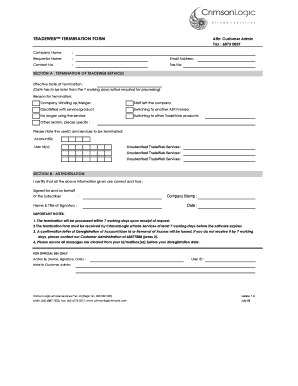
Get Tradeweb Termination Form Attn: Customer Admin Fax : 6873 ...
How it works
-

Open form follow the instructions
-

Easily sign the form with your finger
-

Send filled & signed form or save
How to fill out the TRADEWEB TERMINATION FORM Attn: Customer Admin Fax : 6873 online
This guide provides a comprehensive overview of how to fill out the TradeWeb Termination Form effectively. Whether you are a user with extensive experience or new to this process, follow the steps below to ensure a smooth completion of the form.
Follow the steps to successfully complete the form.
- To obtain the form, press the ‘Get Form’ button and access the document in your preferred online editor.
- Begin by filling in the 'Company Name' field with the official name of your organization. Make sure it is accurate as it will be used for verification.
- Next, provide the 'Requestor Name'. This should be the name of the individual initiating the termination request.
- In the 'Email Address' field, enter a valid email address for further communication regarding this request.
- Include the 'Contact No' to provide a direct line of communication. This ensures you can be reached if further clarification is needed.
- Fill in the 'Fax No' if applicable; this serves as an additional method to contact you.
- Move on to 'SECTION A: TERMINATION OF TRADEWEB SERVICES'. Specify the 'Effective Date of Termination', ensuring it is at least 7 working days in advance as required.
- Select the 'Reason for Termination' by marking the appropriate box. If the reason is not listed, please specify under 'Other reason'.
- Provide the 'userID and services to be terminated', including the 'AccountID' and appropriate 'User Id(s)'.
- Detail any 'Unsubscribed TradeWeb Services' by listing them clearly to ensure accurate processing of your request.
- In 'SECTION B: AUTHORIZATION', ensure you certify that all provided information is correct. Sign on behalf of the subscriber.
- Add the 'Company Stamp' where required.
- Complete the form by adding the 'Name & Title of Signatory' along with the 'Date'.
- Review all entered information for accuracy before proceeding to finalize submission.
- Once completed, you can save your changes, download a copy for your records, and print or share the form if necessary.
Take action now and complete your termination form online to ensure a smooth transition.
The Refinitiv Owners own a majority of the combined voting power in us. As a result, we are a “controlled company” within the meaning of the corporate governance standards of Nasdaq.
Industry-leading security and compliance
US Legal Forms protects your data by complying with industry-specific security standards.
-
In businnes since 199725+ years providing professional legal documents.
-
Accredited businessGuarantees that a business meets BBB accreditation standards in the US and Canada.
-
Secured by BraintreeValidated Level 1 PCI DSS compliant payment gateway that accepts most major credit and debit card brands from across the globe.