Loading
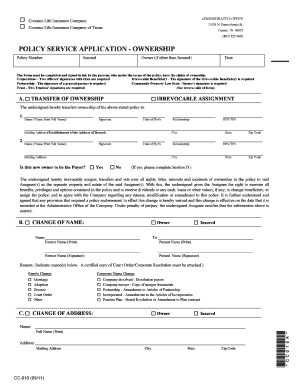
Get Name-owner Change Form - State Securities Corporation
How it works
-

Open form follow the instructions
-

Easily sign the form with your finger
-

Send filled & signed form or save
How to fill out the Name-Owner Change Form - State Securities Corporation online
Filling out the Name-Owner Change Form for the State Securities Corporation is a straightforward process that ensures accurate and updated information regarding ownership. This guide will walk you through each section and field of the form, allowing you to complete it with confidence and ease.
Follow the steps to successfully fill out the Name-Owner Change Form online.
- Click 'Get Form' button to obtain the form and open it in the online editor.
- Begin filling out the policy number section. This identifier is crucial for processing your request.
- Next, enter the name of the insured, which may differ from the policy owner.
- If the owner is different from the insured, provide the owner's name in the designated field. Ensure to include their signature.
- Choose whether you are transferring ownership or making an irrevocable assignment by checking the appropriate box in section A.
- For a transfer of ownership, provide the new owner's full name, signature, date of birth, and mailing address. Also, indicate the relationship to the previous owner.
- In section B, if you are changing the name of the owner, fill in the former and present name, along with the reason for the name change.
- If a change of address is needed, complete section C with the full name and new mailing address.
- If applicable, fill out section D regarding a change of payor, supplying all required information and mode of payment preferences.
- Finally, sign and date the authorization/signatures section, ensuring all parties involved are appropriately signed.
- After thoroughly reviewing the completed form, users can save changes, download, print, or share the form for submission.
Complete your Name-Owner Change Form online to ensure your ownership details are correctly updated.
Unlike a registration statement on Form S-1, a Registration statement on Form 10 registers a class of securities such as common or preferred stock pursuant to Section 12(b) or 12 (g) of the Securities Exchange Act of 1934.
Industry-leading security and compliance
US Legal Forms protects your data by complying with industry-specific security standards.
-
In businnes since 199725+ years providing professional legal documents.
-
Accredited businessGuarantees that a business meets BBB accreditation standards in the US and Canada.
-
Secured by BraintreeValidated Level 1 PCI DSS compliant payment gateway that accepts most major credit and debit card brands from across the globe.