Loading
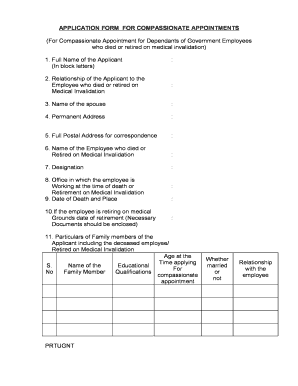
Get Application Form For Compassionate ... - Gunturbadi
How it works
-

Open form follow the instructions
-

Easily sign the form with your finger
-

Send filled & signed form or save
How to fill out the APPLICATION FORM FOR COMPASSIONATE APPOINTMENTS online
This guide provides clear and supportive instructions for completing the APPLICATION FORM FOR COMPASSIONATE APPOINTMENTS for dependants of government employees who have died or retired on medical invalidation. By following these steps, you can navigate the form with ease.
Follow the steps to fill out the application form successfully.
- Click ‘Get Form’ button to access the APPLICATION FORM FOR COMPASSIONATE APPOINTMENTS and open it in your preferred document editor.
- Begin with filling in your full name in block letters as the applicant. This ensures clarity in your identity on the form.
- Indicate your relationship to the employee who has either died or retired on medical invalidation. This detail clarifies your connection and eligibility.
- Provide the name of the spouse if applicable. This helps in verifying your family situation.
- Enter your permanent address. This information is crucial for correspondence and verification purposes.
- Fill in your full postal address for correspondence, ensuring it is accurate for any follow-up communications.
- List the name of the employee who died or retired on medical invalidation. This should match official records.
- State the designation of the deceased or retired employee, which is important for identifying their position and relevance.
- Record the date and place of the employee's death or retirement. Provide precise details as these will be confirmed against official documentation.
- If applicable, provide the retirement date for the employee alongside necessary supporting documents. This is critical for the validation of the application.
- Detail the particulars of all family members, including their age at the time of application, educational qualifications, marital status, and their relationship to the employee.
- Select your caste status, indicating whether you belong to a schedule caste, schedule tribes, backward caste, or others.
- Enter your date of birth, ensuring it aligns with identification documents.
- Outline the financial status of your family to ascertain your need for compassionate appointment support.
- Provide educational qualifications, listing examinations passed along with the respective institutions.
- Mention your native place and mandal for further demographic clarity.
- Indicate if any family member is currently employed and provide respective details. This helps assess family dependency.
- Confirm if you have registered with the employment exchange, along with details such as the exchange's name, registration number, and date.
- Verify the inclusion of all required documents by marking yes or no for each mentioned certificate such as the death certificate, caste certificate, nativity certificate, and others.
- Sign and date the declaration affirming that the information provided is accurate and truthful. This step is essential for validating your application.
- Finally, save the completed document, and if necessary, download or print it for submission or sharing.
Complete your APPLICATION FORM FOR COMPASSIONATE APPOINTMENTS online today and ensure your application is processed smoothly.
The Government servant should have retired on medical grounds before attaining the age of 55 years (57 years for erstwhile Group D employees). compassionate grounds?