Loading
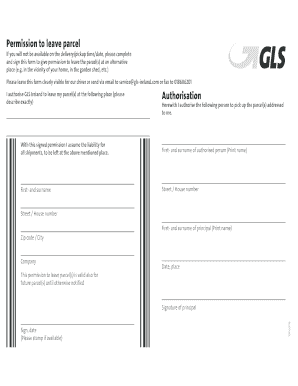
Get Https Forms Gls Exdf67pbxk7rthxva
How it works
-

Open form follow the instructions
-

Easily sign the form with your finger
-

Send filled & signed form or save
How to fill out the Https Forms Gls Exdf67pbxk7rthxva online
This guide provides clear and supportive instructions on how to effectively fill out the Https Forms Gls Exdf67pbxk7rthxva online. You will find step-by-step guidance tailored to your needs, ensuring a seamless experience.
Follow the steps to successfully complete the form.
- Click ‘Get Form’ button to obtain the form and open it in the editor.
- Clearly indicate your preferred alternative location for parcel delivery by providing a detailed description, such as 'in the garden shed' or 'behind the front gate.'
- In the authorisation section, write down the full name of the person you are authorising to pick up the parcel(s) addressed to you. Print the name clearly.
- Fill in the street and house number of the authorised person's address accurately to ensure correct identification.
- Provide the zip code and city for the authorised person to enhance clarity regarding their location.
- Print your own name in the designated space to confirm the permission you are granting.
- Indicate the date and place where you are filling out this form.
- Sign and date the form to validate your authorisation. If available, please stamp the form as well.
- Review the completed form for accuracy, then save the changes. You can download, print, or share the form as needed.
Complete your documents online with confidence using these instructions!