Loading
Get Direct Debit Form - Philips Lifeline
How it works
-

Open form follow the instructions
-

Easily sign the form with your finger
-

Send filled & signed form or save
How to fill out the Direct Debit Form - Philips Lifeline online
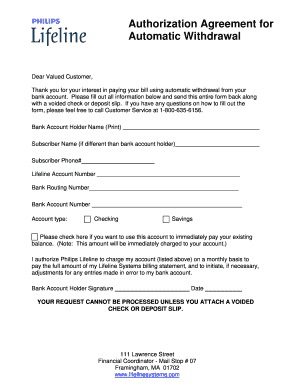
Filling out the Direct Debit Form for Philips Lifeline is a straightforward process that allows you to set up automatic payments for your billing statement. This guide will assist you through each section of the form to ensure accurate and efficient completion.
Follow the steps to complete the form accurately.
- Click ‘Get Form’ button to obtain the form and open it in the editor.
- Fill in the 'Bank Account Holder Name' field with the name of the individual who holds the bank account. If this is different from the subscriber name, enter the subscriber's name in the 'Subscriber Name' field.
- Enter the 'Subscriber Phone #' to provide a contact number for any follow-up regarding the form.
- Insert your 'Lifeline Account Number' in the appropriate space to ensure that your payments are accurately applied to your account.
- Provide your 'Bank Routing Number', which is a nine-digit number identifying your bank within the financial system.
- Enter your 'Bank Account Number', which is the unique number for your bank account.
- Select the type of account by checking either 'Checking' or 'Savings' based on the account you are using for the payments.
- If you wish to use this account to immediately pay your existing balance, check the designated box.
- Review the authorization statement. By signing, you agree to allow Philips Lifeline to charge your account for the monthly billing.
- Provide your 'Bank Account Holder Signature' and date the form to confirm your authorization.
- Remember that your request cannot be processed unless you attach a voided check or deposit slip. This is crucial for verification purposes.
- After completing the form, save the changes, and consider downloading or printing a copy for your records before submitting it as instructed.
Complete your Direct Debit Form online today for a seamless payment experience.
Is Life Alert Worth It? Life Alert's monthly fees are pricey, ranging from $69.90 to $89.85 per month. In comparison to other medical alert prices, most medical alert costs range between $24.95 and $49.95 monthly.