Loading
Get Group Update/registration Form (.pdf) - Nacolorado
How it works
-

Open form follow the instructions
-

Easily sign the form with your finger
-

Send filled & signed form or save
How to fill out the Group Update/Registration Form (.PDF) - Nacolorado online
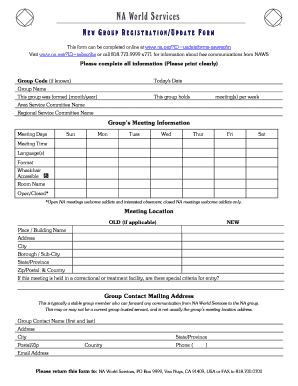
Filling out the Group Update/Registration Form is an important step for groups wishing to update their information or register with Nacolorado. This guide provides clear instructions to help users complete the form accurately and effectively.
Follow the steps to successfully complete the form.
- Press the ‘Get Form’ button to access the form and open it in your preferred editor.
- Fill in today's date in the designated field at the top of the form.
- If applicable, provide your group code in the next field.
- Enter the full name of your group in the 'Group Name' section.
- Specify when your group was formed by entering the month and year in the respective fields.
- Indicate how many meetings your group holds per week in the designated area.
- List the names of the Area Service Committee and Regional Service Committee for your group.
- Provide the meeting information, including the days of the week your group meets. Check all applicable boxes.
- Enter the meeting time and languages spoken during the meetings.
- Indicate if the meeting is wheelchair accessible by checking the appropriate box.
- Specify the room name where meetings are held.
- Select whether the meeting is open or closed, and provide details if applicable.
- Fill out the meeting location details, including the place/building name, address, city, borough/sub-city, state/province, zip/postal code, and country.
- If applicable, state whether there are special criteria for entry if the meeting is held in a correctional or treatment facility.
- Provide the group contact mailing address, ensuring it is a stable group member who can relay communications.
- Fill in the group contact's full name, address, city, state/province, postal/zip code, country, phone number, and email address.
- Review all filled information for accuracy before submitting.
- After completing the form, you can save changes, download, print, or share the document as needed.
Complete your Group Update/Registration Form online today to stay connected with Nacolorado.
In order to obtain a new copy of your vehicle registration or title please visit: mydmv.colorado.gov. Go to the "Vehicle Services" tab and then select "Request a duplicate registration card" or "Request a duplicate title."