Loading
Form preview
  • US Legal Forms
  • Form Library
  • More Forms
  • More Uncategorized Forms
  • 401(k) Operations

Get 401(k) Operations

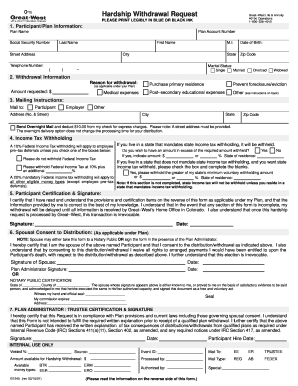
Hardship Withdrawal Request Great West Life & Annuity 401(k) Operations 1 800 338 4015 PLEASE PRINT LEGIBLY IN BLUE OR BLACK INK 1. Participant/Plan Information: Plan Name Plan Account Number.

How it works

  1. Open form

    Open form follow the instructions

  2. Easily sign form

    Easily sign the form with your finger

  3. Share form

    Send filled & signed form or save

How to fill out the 401(k) Operations online

Filling out the 401(k) Operations form online is an essential step for anyone seeking to make a hardship withdrawal from their retirement account. This guide provides straightforward instructions to ensure that you complete the form accurately and efficiently.

Follow the steps to effectively complete your 401(k) Operations withdrawal request.

  1. Click ‘Get Form’ button to obtain the form and open it in the editor.
  2. Begin by providing your participant and plan information in Section 1. Fill in the plan name, plan account number, social security number, last name, first name, street address, city, state, zip code, date of birth, and telephone number. Ensure all entries are legible and accurate.
  3. Indicate your marital status by checking the appropriate box: Single, Married, Divorced, or Widowed.
  4. In Section 2, detail your withdrawal information. Select the appropriate reason for your withdrawal from the provided options and specify the amount you are requesting.
  5. In Section 3, provide the mailing instructions by indicating whether the funds should be sent to you, your employer, or another address. Be sure to include the full mailing address, including state and zip code.
  6. In Section 4, specify any income tax withholding preferences. Choose if additional federal income tax should be withheld and enter your state of residence. Make sure to read the instructions on mandatory withholding carefully.
  7. In Section 5, review and certify your information by signing and dating the form. Ensure that you acknowledge understanding the terms of the withdrawal.
  8. If applicable, complete Section 6 for spousal consent. The spouse must sign the form in the presence of a plan administrator or notary public, also indicating the date.
  9. In Section 7, the plan administrator or trustee must sign and date the form, certifying compliance with plan provisions and laws.
  10. Once all sections are filled out and reviewed, you can save changes, download, print, or share the completed form as needed.

Complete your 401(k) Operations form online today to initiate your hardship withdrawal.

Get form

Experience a faster way to fill out and sign forms on the web. Access the most extensive library of templates available.
Get form

Related content

Operating a 401k Plan | Internal Revenue Service
Nov 23, 2020 — Plan operational elements that need to be handled by employers who have...
Learn more
401(k) - eGrove
elective deferrals to 401(k) plans and similar arrangements,. (2) ... Effective and...
Learn more
Appliance Business Resources | Fluid Services
... are for company owners and service managers for appliance repair operations....
Learn more

Related links form

Disdetta Carta Di Credito Postfinance Fringe Benefit Statement National Conference On Recent Trends In Mechanical Engineering Section I IFSP Meeting Request Completed By Service

Questions & Answers

Get answers to your most pressing questions about US Legal Forms API.

Contact support

To complete the paperwork that gives you access to your 401(k) funds, you will likely work with your plan administrator, the investment firm that manages the 401(k) and the bank or brokerage firm that holds your new account, if you plan to reinvest it. This process can take a couple of days to a few weeks.

Investing during the coronavirus pandemic recession It may seem daunting to put your money into stocks or a 401(k) plan right now, but financial experts say recessions can be a great time to start investing for the long term. ... It's a really good time to invest, especially with a 401(k) plan.

Rollover your retirement savings account into an IRA If you are fired or laid off, you have the right to move the money from your 401k account to an IRA without paying any income taxes on it. This is called a rollover IRA.

There's more than a few reasons that I think 401(k)s are a bad idea, including that you give up control of your money, have extremely limited investment options, can't access your funds until your 59.5 or older, are not paid income distributions on your investments, and don't benefit from them during the most expensive ...

While 401(k) plans are a valuable part of retirement planning for most U.S. workers, they're not perfect. The value of 401(k) plans is based on the concept of dollar-cost averaging, but that's not always a reliable theory. Many 401(k) plans are expensive because of high administrative and record-keeping costs.

401(k) recordkeepers track assets in retirement plans. They may do other things as well, but a recordkeeper's main function is to track how much you have, where it is, and what type of money it is. Recordkeeping fees may be paid by employers, employees, or both.

Your employer can remove money from your 401(k) after you leave the company, but only under certain circumstances. If your balance is less than $1,000, your employer can cut you a check.

Absolutely. Whether you're a freelancer, an independent contractor or a budding entrepreneur, you have access to an expanded range of retirement plans, including an Individual 401(k) and a SEP IRA. These plans offer higher contribution limits than traditional IRAs, with tax advantages.

Keep your 401(k) with your former employer. Most companies but not all allow you to keep your retirement savings in their plans after you leave. ... Roll over the money into an IRA. ... Roll over your 401(k) into a new employer's plan. ... Cash out.

If you get terminated from your job, you have the ability to cash out the money in your 401(k) even if you haven't reached 59 1/2 years of age. This includes any money you've contributed and any vested contributions from your employer -- plus any investment profits your account has generated.

Get This Form Now!

Use professional pre-built templates to fill in and sign documents online faster. Get access to thousands of forms.
Get form
If you believe that this page should be taken down, please follow our DMCA take down processhere.

Industry-leading security and compliance

US Legal Forms protects your data by complying with industry-specific security standards.
  • In businnes since 1997
    25+ years providing professional legal documents.
  • Accredited business
    Guarantees that a business meets BBB accreditation standards in the US and Canada.
  • Secured by Braintree
    Validated Level 1 PCI DSS compliant payment gateway that accepts most major credit and debit card brands from across the globe.
Get 401(k) Operations
Get form
  • Adoption
  • Bankruptcy
  • Contractors
  • Divorce
  • Home Sales
  • Employment
  • Identity Theft
  • Incorporation
  • Landlord Tenant
  • Living Trust
  • Name Change
  • Personal Planning
  • Small Business
  • Wills & Estates
  • Packages A-Z
  • Affidavits
  • Bankruptcy
  • Bill of Sale
  • Corporate - LLC
  • Divorce
  • Employment
  • Identity Theft
  • Internet Technology
  • Landlord Tenant
  • Living Wills
  • Name Change
  • Power of Attorney
  • Real Estate
  • Small Estates
  • Wills
  • All Forms
  • Forms A-Z
  • Form Library
  • Legal Hub
  • About Us
  • Help Portal
  • Legal Resources
  • Blog
  • Affiliates
  • Contact Us
  • Delete My Account
  • Site Map
  • Industries
  • Forms in Spanish
  • Localized Forms
  • State-specific Forms
  • Forms Kit
  • Real Estate Handbook
  • All Guides
  • Notarize
  • Incorporation services
  • For Consumers
  • For Small Business
  • For Attorneys
  • USLegal
  • FormsPass
  • pdfFiller
  • signNow
  • altaFlow
  • DocHub
  • Instapage
Form Packages
  • Adoption
  • Bankruptcy
  • Contractors
  • Divorce
  • Home Sales
  • Employment
  • Identity Theft
  • Incorporation
  • Landlord Tenant
  • Living Trust
  • Name Change
  • Personal Planning
  • Small Business
  • Wills & Estates
  • Packages A-Z
Form Categories
  • Affidavits
  • Bankruptcy
  • Bill of Sale
  • Corporate - LLC
  • Divorce
  • Employment
  • Identity Theft
  • Internet Technology
  • Landlord Tenant
  • Living Wills
  • Name Change
  • Power of Attorney
  • Real Estate
  • Small Estates
  • Wills
  • All Forms
  • Forms A-Z
  • Form Library
Customer Service
  • Legal Hub
  • About Us
  • Help Portal
  • Legal Resources
  • Blog
  • Affiliates
  • Contact Us
  • Delete My Account
  • Site Map
  • Industries
  • Forms in Spanish
  • Localized Forms
  • State-specific Forms
  • Forms Kit
Legal Guides
  • Real Estate Handbook
  • All Guides
Prepared for you
  • Notarize
  • Incorporation services
Our Customers
  • For Consumers
  • For Small Business
  • For Attorneys
Our Sites
  • USLegal
  • FormsPass
  • pdfFiller
  • signNow
  • altaFlow
  • DocHub
  • Instapage
Social Media
Call us now toll free:
+1 833 426 79 33
As seen in:
© Copyright 1999-2026 airSlate Legal Forms, Inc. 3720 Flowood Dr, Flowood, Mississippi 39232
  • Your Privacy Choices
  • Terms of Service
  • Privacy Notice
  • Content Takedown Policy
  • Bug Bounty Program