Loading
Get Marine21
How it works
-

Open form follow the instructions
-

Easily sign the form with your finger
-

Send filled & signed form or save
How to fill out the Marine21 online
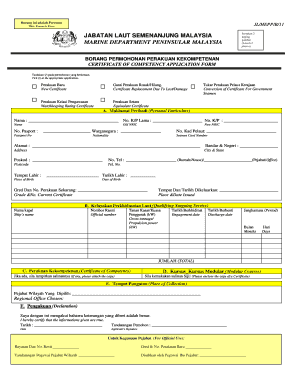
Filling out the Marine21 form is a crucial step for individuals seeking a certificate of competency. This guide will provide you with a detailed, user-friendly approach to ensure that your application process is as smooth as possible.
Follow the steps to successfully complete the Marine21 form online.
- Click ‘Get Form’ button to obtain the form and open it in the editor.
- Begin by selecting the appropriate application type by marking the relevant box for either a new certificate, certificate replacement for a lost or damaged certificate, watchkeeping rating certificate, equivalent certificate, or conversion of certificate for government seamen.
- Proceed to fill out section A: Personal particulars. Ensure to enter your name, old and new identification numbers, passport number, nationality, seamen card number, address, city and state, postcode, telephone number, place of birth, and date of birth.
- In section B: Qualifying seagoing service, provide details of your ship's name, official number, gross tonnage or propulsion power, engagement date, discharge date, and the total period of service in months.
- For section C: Certificate of competency, if you have any existing certificates, please attach copies as required.
- Complete section D: Modular courses by enclosing the copy of the certificates of modular courses you have attended.
- Fill out section E: Place of collection by indicating the chosen regional office where you wish to collect the certificate.
- In section F: Declaration, affirm that the information you have provided is true by signing and dating the application.
- Review the entire form for accuracy before proceeding. Once satisfied with your input, you can save changes, download, print, or share the completed form.
Complete your Marine21 application online today to ensure a timely and efficient process.