Loading
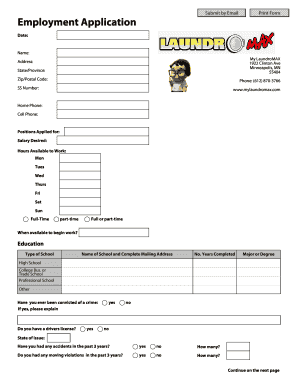
Get Employment Application - Mylaundromax.com
How it works
-

Open form follow the instructions
-

Easily sign the form with your finger
-

Send filled & signed form or save
How to fill out the Employment Application - Mylaundromax.com online
Completing an employment application online can be straightforward when you understand each section. This guide will provide step-by-step instructions to help you accurately fill out the Employment Application for My LaundroMAX.
Follow the steps to successfully complete your application.
- Press the ‘Get Form’ button to access the Employment Application form and open it in the online editor.
- Begin by entering the date at the top of the form. Ensure that it reflects the current date when you are submitting your application.
- Provide your name clearly in the designated field. This helps in identifying your application.
- Fill in the address section with your current residential information, including street address, state or province, and zip or postal code.
- Enter your phone number, ensuring to include the area code. Also, provide your home and cell phone numbers if applicable.
- Specify the positions you are applying for and your expected salary. Indicate your available working hours for each day of the week.
- Indicate when you would be available to begin work. This helps the employer in scheduling and planning.
- In the education section, select the type of school you attended and fill in the name and complete mailing address of each institution. List the number of years completed and any majors or degrees obtained.
- Provide honest answers regarding any criminal convictions, explaining any 'yes' answers as instructed on the form.
- Indicate whether you have a driver's license and specify the state of issue. Additionally, answer questions about any accidents or moving violations in the past three years.
- List your previous employment experience in up to three positions. For each job, provide the employer’s name, your supervisor’s name, dates of employment, salary, complete address, phone number, last job title, and a specific reason for leaving.
- Detail the jobs held, duties performed, skills used or learned, and any advancements during your employment for each position listed.
- Answer whether the employer may be contacted regarding your previous employment.
- In the skills section, indicate your typing and computer proficiency. Specify which computer applications you are familiar with.
- Provide two professional references, excluding relatives and previous employers, including their name, position, company, and telephone number.
- Use the additional information space to outline any qualifications or experiences that enhance your application.
- Finally, review all the information for accuracy, and utilize the options to save changes, download, print, or share the completed form.
Complete your employment application online today and take a step closer to joining the My LaundroMAX team!
Update your resume. Update your profile on professional networking platforms. Use keywords. Use job search engines and company websites. Be selective. Draft a separate cover letter for each application. Complete an online job application. Make sure your responses are error-free, accurate and fully completed.