Loading
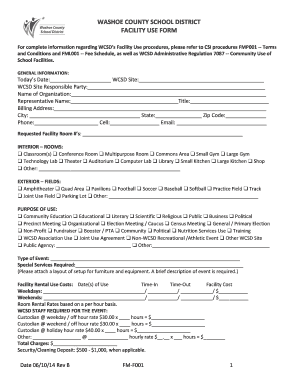
Get For Complete Information Regarding Wcsds Facility Use Procedures, Please Refer To Csi Procedures
How it works
-

Open form follow the instructions
-

Easily sign the form with your finger
-

Send filled & signed form or save
How to fill out the For Complete Information Regarding WCSDs Facility Use Procedures, Please Refer To CSI Procedures online
This guide provides clear, step-by-step instructions on how to fill out the Facility Use Form for the Washoe County School District (WCSD). Whether you are a first-time user or have experience with facility requests, this comprehensive guide aims to support your application process.
Follow the steps to successfully complete the facility use form.
- Click the ‘Get Form’ button to access and open the Facility Use Form in the designated editor.
- Fill out the general information section, including the date of the application, the specific WCSD site, the name of the responsible party, and contact information including phone number, email, and billing address.
- Select the requested facility room numbers from the interior and exterior options listed on the form.
- Indicate the purpose of use by checking the relevant categories provided, such as educational, community, or organizational.
- Specify the type of event you are planning, along with any special services required, and ensure to attach any additional layout information as necessary.
- Complete the rental use costs section by detailing the dates, times, and relevant costs associated with the facility rental.
- List any required staff for the event, specifying the number of hours for custodians and calculating their total cost.
- Indicate whether food will be served at the event and if health certifications are in place, along with catering information if applicable.
- Select any audio/visual equipment you may need for your event, ensuring to note how many units and for how many days you will require them.
- Review and attach any required application documents, such as insurance certificates and nonprofit forms, ensuring your application meets the submission deadline.
- Read the Hold Harmless Agreement carefully, sign, and date the bottom portion of the form, completing your application for facility use.
- After all fields are complete and all necessary documents are attached, save changes, and proceed to download, print, or share your completed form as needed.
Begin your application online now to ensure you secure the facility for your event.