Loading
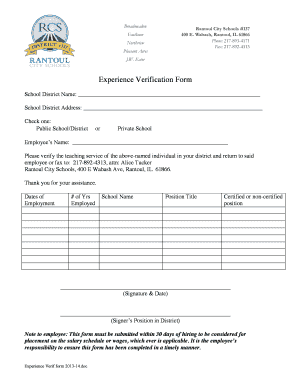
Get Experience Verification Form - Rcs - Rcs K12 Il
How it works
-

Open form follow the instructions
-

Easily sign the form with your finger
-

Send filled & signed form or save
How to use or fill out the Experience Verification Form - RCS - Rcs K12 Il online
This guide provides a comprehensive overview of how to accurately fill out the Experience Verification Form - RCS - Rcs K12 Il online. Follow these step-by-step instructions to ensure a smooth process in documenting and verifying teaching service.
Follow the steps to complete the form easily and effectively.
- Click ‘Get Form’ button to acquire the form and open it in the editing interface.
- Begin by filling in the school district name in the provided field. This identifies the district relevant to the verification.
- Next, complete the school district address. Ensure that all details, including street, city, state, and zip code, are accurately provided.
- In the section asking to check one option, select either ‘Public School/District’ or ‘Private School’ to categorize the institution appropriately.
- Enter the employee's name in the designated field. Make sure to type it exactly as it appears in official records.
- Provide details regarding the employee's teaching service by listing the dates of employment. Include the start and end dates.
- Indicate the number of years the employee has been employed in each role.
- Enter the school name where the individual worked. Ensure the name correctly matches the school’s official title.
- Specify the position title held by the employee in the next field.
- Choose whether the position was certified or non-certified by checking the appropriate box.
- Have the form signed and dated by the appropriate individual in the school district. This section confirms the validity of the information provided.
- Finally, save the changes, and consider downloading, printing, or sharing the completed form as necessary.
Take the next step by completing the Experience Verification Form online now.
Industry-leading security and compliance
US Legal Forms protects your data by complying with industry-specific security standards.
-
In businnes since 199725+ years providing professional legal documents.
-
Accredited businessGuarantees that a business meets BBB accreditation standards in the US and Canada.
-
Secured by BraintreeValidated Level 1 PCI DSS compliant payment gateway that accepts most major credit and debit card brands from across the globe.