Loading
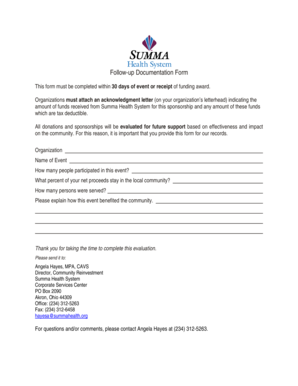
Get Follow-up Documentation Form - Summahealth
How it works
-

Open form follow the instructions
-

Easily sign the form with your finger
-

Send filled & signed form or save
How to fill out the Follow-up Documentation Form - Summahealth online
This guide provides clear and comprehensive instructions on completing the Follow-up Documentation Form for Summahealth online. Follow the steps below to ensure all necessary information is accurately submitted for review.
Follow the steps to successfully complete the form.
- Press the ‘Get Form’ button to obtain the form and launch it in your editing platform.
- Enter your organization's name in the designated field. This should reflect the official name of the entity submitting the form.
- Provide the name of the event that is associated with this documentation. Ensure the name is clear and specific.
- Indicate the total number of participants in the event. This should include all individuals who attended or took part.
- Specify the percentage of net proceeds that remain in the local community. This information is critical for evaluating community impact.
- Detail the total number of people served through the event. This figure helps gauge the event's reach.
- Provide a thorough description of how the event benefited the community. Use clear and specific examples to illustrate the impact.
- After completing all fields, review your entries for accuracy. Once confirmed, you can save changes, download, print, or share the form as needed.
Complete the Follow-up Documentation Form online today to ensure your contributions are recognized and evaluated.
Get form
Experience a faster way to fill out and sign forms on the web. Access the most extensive library of templates available.
3M HIS – the Medical Records system.
Get This Form Now!
Use professional pre-built templates to fill in and sign documents online faster. Get access to thousands of forms.