Loading
Form preview
  • US Legal Forms
  • Form Library
  • More Forms
  • More Uncategorized Forms
  • What I Did Today

Get What I Did Today

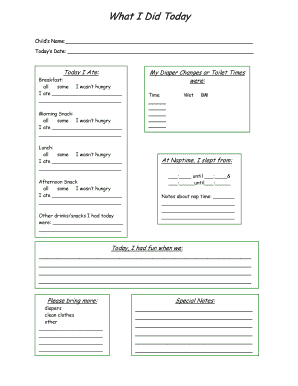
Page 1. What I Did Today. Child's Name: Today's Date: Today I Ate: Breakfast: all br some I wasn't hungry. I ate. Morning Snack: all some I wasn't hungry. I ate .

How it works

  1. Open form

    Open form follow the instructions

  2. Easily sign form

    Easily sign the form with your finger

  3. Share form

    Send filled & signed form or save

How to fill out the What I Did Today online

Filling out the What I Did Today form is an essential task that helps document and communicate important information about a child's daily activities. This guide provides clear step-by-step instructions on how to properly complete each section of the form online.

Follow the steps to complete the What I Did Today form effectively.

  1. Press the ‘Get Form’ button to access the What I Did Today form, which will open in the designated editor for online completion.
  2. Enter the child's name in the appropriate field at the top of the form.
  3. Fill in today's date, ensuring it is formatted correctly.
  4. In the 'Today I Ate' section, select one option for breakfast: 'all,' 'some,' or 'I wasn’t hungry.' Then, describe what was eaten in the provided space.
  5. Document diaper changes or toilet times by noting the specific times and marking if each one was wet.
  6. For morning snack, choose whether the child ate 'all,' 'some,' or 'wasn’t hungry,' and list what was consumed.
  7. Repeat the previous step for lunch and afternoon snack, documenting selections and meals accordingly.
  8. List any other drinks or snacks had during the day in the designated area.
  9. Record bowel movements (BM) by marking each instance and its timing.
  10. Specify nap times by indicating start and end times and include any relevant notes about nap duration.
  11. Provide descriptions of the fun activities that took place during the day in the space provided.
  12. Under 'Please bring more:', indicate any additional items needed, such as diapers or clean clothes.
  13. Complete the special notes section with any remarks that may be relevant to the child’s day.
  14. Once you have filled out all sections, save your changes, and choose to download, print, or share the form as necessary.

Start completing your documents online today!

Get form

Experience a faster way to fill out and sign forms on the web. Access the most extensive library of templates available.
Get form

Related content

What Did You Do Today?: Kerry Arquette, Nancy...
That's what I did today." The bee's annoyed expression and the bear's dismay are...
Learn more
What I did today - krbdev.mit.edu
... My Reminders · Logged in as guest. Active tickets for guest. Time to display:...
Learn more
Today (American TV program) - Wikipedia
Today is an American news and talk morning television show that airs on NBC. The program...
Learn more

Related links form

L4 Form 2020 Mysterious Monster Lab Salamander Dichotomous Key Bank Statement For University

Get This Form Now!

Use professional pre-built templates to fill in and sign documents online faster. Get access to thousands of forms.
Get form
If you believe that this page should be taken down, please follow our DMCA take down processhere.

Industry-leading security and compliance

US Legal Forms protects your data by complying with industry-specific security standards.
  • In businnes since 1997
    25+ years providing professional legal documents.
  • Accredited business
    Guarantees that a business meets BBB accreditation standards in the US and Canada.
  • Secured by Braintree
    Validated Level 1 PCI DSS compliant payment gateway that accepts most major credit and debit card brands from across the globe.
Get What I Did Today
Get form
  • Adoption
  • Bankruptcy
  • Contractors
  • Divorce
  • Home Sales
  • Employment
  • Identity Theft
  • Incorporation
  • Landlord Tenant
  • Living Trust
  • Name Change
  • Personal Planning
  • Small Business
  • Wills & Estates
  • Packages A-Z
  • Affidavits
  • Bankruptcy
  • Bill of Sale
  • Corporate - LLC
  • Divorce
  • Employment
  • Identity Theft
  • Internet Technology
  • Landlord Tenant
  • Living Wills
  • Name Change
  • Power of Attorney
  • Real Estate
  • Small Estates
  • Wills
  • All Forms
  • Forms A-Z
  • Form Library
  • Legal Hub
  • About Us
  • Help Portal
  • Legal Resources
  • Blog
  • Affiliates
  • Contact Us
  • Delete My Account
  • Site Map
  • Industries
  • Forms in Spanish
  • Localized Forms
  • State-specific Forms
  • Forms Kit
  • Real Estate Handbook
  • All Guides
  • Notarize
  • Incorporation services
  • For Consumers
  • For Small Business
  • For Attorneys
  • USLegal
  • FormsPass
  • pdfFiller
  • signNow
  • altaFlow
  • DocHub
  • Instapage
Form Packages
  • Adoption
  • Bankruptcy
  • Contractors
  • Divorce
  • Home Sales
  • Employment
  • Identity Theft
  • Incorporation
  • Landlord Tenant
  • Living Trust
  • Name Change
  • Personal Planning
  • Small Business
  • Wills & Estates
  • Packages A-Z
Form Categories
  • Affidavits
  • Bankruptcy
  • Bill of Sale
  • Corporate - LLC
  • Divorce
  • Employment
  • Identity Theft
  • Internet Technology
  • Landlord Tenant
  • Living Wills
  • Name Change
  • Power of Attorney
  • Real Estate
  • Small Estates
  • Wills
  • All Forms
  • Forms A-Z
  • Form Library
Customer Service
  • Legal Hub
  • About Us
  • Help Portal
  • Legal Resources
  • Blog
  • Affiliates
  • Contact Us
  • Delete My Account
  • Site Map
  • Industries
  • Forms in Spanish
  • Localized Forms
  • State-specific Forms
  • Forms Kit
Legal Guides
  • Real Estate Handbook
  • All Guides
Prepared for you
  • Notarize
  • Incorporation services
Our Customers
  • For Consumers
  • For Small Business
  • For Attorneys
Our Sites
  • USLegal
  • FormsPass
  • pdfFiller
  • signNow
  • altaFlow
  • DocHub
  • Instapage
Social Media
Call us now toll free:
+1 833 426 79 33
As seen in:
© Copyright 1999-2026 airSlate Legal Forms, Inc. 3720 Flowood Dr, Flowood, Mississippi 39232
  • Your Privacy Choices
  • Terms of Service
  • Privacy Notice
  • Content Takedown Policy
  • Bug Bounty Program