Loading
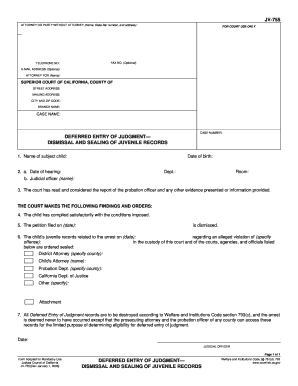
Get Jv-755 Deferred Entry Of Judgment Dismissal And Sealing Of Juvenile Records. Judicial Council Forms
How it works
-

Open form follow the instructions
-

Easily sign the form with your finger
-

Send filled & signed form or save
How to fill out the JV-755 Deferred Entry Of Judgment Dismissal And Sealing Of Juvenile Records online
Filling out the JV-755 form is an important step in the process of having juvenile records sealed. This guide provides clear and supportive instructions to help you navigate the form efficiently, ensuring that you understand each section and field.
Follow the steps to complete the JV-755 form accurately.
- To begin, click the ‘Get Form’ button to access the JV-755 form and open it in your chosen editing tool.
- In the first section, enter the name of the subject child and their date of birth. Ensure that the spelling is correct and that the date format is consistent.
- Next, specify the date of the hearing, the department, and the room where the hearing will take place. You will also need to fill in the name of the judicial officer presiding over the case.
- Indicate that the court has reviewed the probation officer's report and any additional evidence presented. This acknowledgment may require a checkbox or a signature.
- In this section, state that the child has complied satisfactorily with the imposed conditions. Ensure that you provide accurate details regarding the petition date, confirming that it is to be dismissed.
- List the details of the juvenile records to be sealed, including the date of arrest, the nature of the alleged offense, and the names of officials or agencies involved, such as the District Attorney or the Probation Department.
- Confirm that all Deferred Entry of Judgment records are to be destroyed as outlined by the relevant Welfare and Institutions Code section, ensuring that you understand the implications of this order.
- Finally, provide the date and ensure that the Judicial Officer's signature is included at the bottom of the form. This may require printing the form for in-person submission or electronic signatures as permitted.
- Once you have completed the form, save your changes, and decide whether to download, print, or share the document, based on your needs.
Complete your forms online to ensure proper documentation and timely processing.
Notice of Entry of Judgment or Order (CIV-130) Tells the parties that a judgment has been entered in a case. Service of this notice sets the start date of important deadlines regarding the ability to set-aside or challenge the judgment.
Industry-leading security and compliance
US Legal Forms protects your data by complying with industry-specific security standards.
-
In businnes since 199725+ years providing professional legal documents.
-
Accredited businessGuarantees that a business meets BBB accreditation standards in the US and Canada.
-
Secured by BraintreeValidated Level 1 PCI DSS compliant payment gateway that accepts most major credit and debit card brands from across the globe.