Loading
Get Rajtax
How it works
-

Open form follow the instructions
-

Easily sign the form with your finger
-

Send filled & signed form or save
How to fill out the Rajtax online
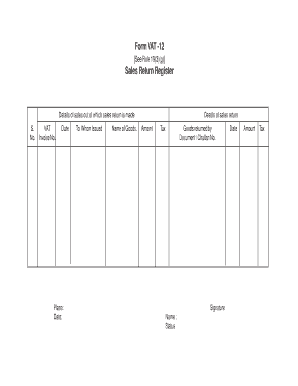
Filling out the Rajtax online is a crucial step for ensuring accurate sales return documentation. This guide aims to provide clear, step-by-step instructions to help users easily navigate the form and complete it correctly.
Follow the steps to successfully complete the Rajtax form.
- Press the ‘Get Form’ button to access the Rajtax form and open it for editing.
- Begin by entering the VAT number in the designated field, ensuring it is accurate and clearly presented.
- Next, provide the corresponding invoice number associated with the sales return, making sure it matches your records.
- Fill in the date of the invoice in the space provided, documenting the specific day of the original sale.
- Specify the place where the sale occurred, providing relevant location details for your records.
- Indicate the name of the person or entity to whom the goods were issued in the appropriate field.
- List the goods being returned in the section labeled 'Name of Goods', making sure to describe each item accurately.
- Document the details of the sales return by entering the amount of the goods returned, including the total value.
- Specify the tax amount associated with the returned goods, ensuring it reflects the correct tax calculations.
- Identify who returned the goods by entering the name of the person or entity responsible for the return.
- Record the document or challan number associated with the return in the provided field for tracking purposes.
- At the bottom of the form, include the required signature of the person completing the form and write in their name and status.
- Finally, include the date of completion of the form entry. Ensure all amounts and taxes are accurate before finalizing.
- Once all fields are accurately filled out, users may choose to save changes, download, print, or share the completed form.
Complete your Rajtax forms online today for a smoother documentation process.
Launching the protest at their head office, Rajasthan Commercial Taxes Service Association (RCTSA) also demanded that all positions from assistant commercial taxes officers (ACTO) to additional commissioners in the VAT regime be designated as assistant commissioner to special commissioners in the GST regime in ...
Industry-leading security and compliance
US Legal Forms protects your data by complying with industry-specific security standards.
-
In businnes since 199725+ years providing professional legal documents.
-
Accredited businessGuarantees that a business meets BBB accreditation standards in the US and Canada.
-
Secured by BraintreeValidated Level 1 PCI DSS compliant payment gateway that accepts most major credit and debit card brands from across the globe.