Loading
Get Keybox Transfer Form - Dfwrealestate.com
How it works
-

Open form follow the instructions
-

Easily sign the form with your finger
-

Send filled & signed form or save
How to fill out the Keybox Transfer Form - DFWRealEstate.com online
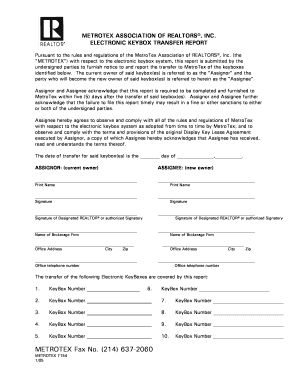
The Keybox Transfer Form is essential for transferring ownership of electronic keyboxes between individuals. This guide provides a detailed, step-by-step approach to ensure that users can complete the form accurately and efficiently online.
Follow the steps to fill out the Keybox Transfer Form online.
- Click the ‘Get Form’ button to access the Keybox Transfer Form and open it in the designated editor.
- Begin by entering the date of transfer for the keyboxes in the space provided.
- Fill in the Assignor section with the current owner’s printed name and signature.
- Complete the Assignee section with the new owner's printed name and signature.
- If applicable, provide the signature of the Designated REALTOR® or authorized signatory and their brokerage information.
- List all keybox numbers being transferred in the specified fields.
- Finally, review all the details for accuracy and completeness before submitting.
- Once finished, save your changes, and choose to download, print, or share the completed form as needed.
Get started with your Keybox Transfer Form today!