Loading
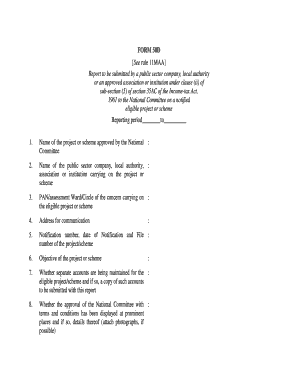
Get Form 58d
How it works
-

Open form follow the instructions
-

Easily sign the form with your finger
-

Send filled & signed form or save
How to fill out the Form 58d online
In this guide, you will learn how to fill out the Form 58d online, which is essential for public sector companies, local authorities, or approved institutions reporting on eligible projects or schemes. This comprehensive instruction aims to assist users with varying levels of experience in digital document management.
Follow the steps to accurately complete Form 58d online.
- Press the ‘Get Form’ button to access the form and open it in your browser.
- Begin by entering the reporting period in the designated section labeled 'Reporting period ________ to ________'.
- Provide the name of the project or scheme as approved by the National Committee in the appropriate field.
- Enter the name of the public sector company, local authority, association, or institution responsible for the project or scheme.
- Fill in the PAN or assessment Ward/Circle of the organization carrying on the eligible project or scheme.
- Provide the address for communication, ensuring it is accurate for correspondence purposes.
- Input the notification number, date of notification, and file number of the project/scheme.
- Describe the objective of the project or scheme in the designated area.
- Indicate whether separate accounts are maintained for the eligible project/scheme and attach a copy of such accounts if applicable.
- State whether the approval details from the National Committee are displayed in prominent locations and, if so, include details and photographs, if possible.
- Complete the performance section for the eligible project during the reporting period, including nature, name, total cost, and amount approved by the National Committee.
- Report on expenditure incurred on the project and donations collected under section 35AC.
- Fill in the target figures to be met and the achievements during the reporting period, stating any reasons for shortfalls.
- At the end, certify the information entered is accurate, sign the form digitally, and enter the date and place of signing.
- Lastly, save your changes, and choose to download, print, or share the completed Form 58d.
Complete your Form 58d online today to ensure compliance and facilitate smooth reporting.
A partnership may, but is not required to, make estimated income tax payments. For more information, including payment options, obtain the 2023 Form 58-ES. A partnership must withhold North Dakota income tax at the rate of 2.90% from the year-end distributive share of North Dakota income of a nonresident partner.
Industry-leading security and compliance
US Legal Forms protects your data by complying with industry-specific security standards.
-
In businnes since 199725+ years providing professional legal documents.
-
Accredited businessGuarantees that a business meets BBB accreditation standards in the US and Canada.
-
Secured by BraintreeValidated Level 1 PCI DSS compliant payment gateway that accepts most major credit and debit card brands from across the globe.