Loading
Get Primary Insurance - Neurologyconcerns.com
How it works
-

Open form follow the instructions
-

Easily sign the form with your finger
-

Send filled & signed form or save
How to fill out the Primary Insurance - NeurologyConcerns.com online
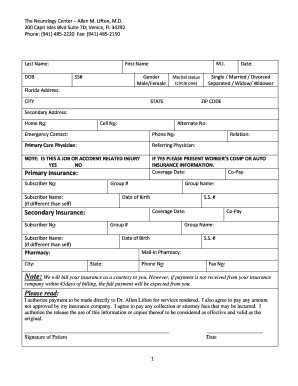
Filling out the Primary Insurance form online can seem daunting, but with clear guidance, you can complete it efficiently. This guide will walk you through each section of the form to ensure that you provide all necessary information for a smooth submission process.
Follow the steps to complete the form successfully:
- Click the ‘Get Form’ button to access the Primary Insurance form and open it in your chosen platform.
- Start by entering your last name, first name, and middle initial in the appropriate fields.
- Provide your date of birth, social security number, and gender, selecting from the options given.
- Indicate your marital status by circling one of the options provided.
- Enter your Florida address, including city, state, and ZIP code.
- If applicable, complete the section for your secondary address and include contact numbers like home, cell, and alternate numbers.
- List your emergency contact and their phone number.
- Fill out information for your primary care physician and referring physician.
- Indicate whether the condition is job or accident-related by selecting yes or no, and provide necessary details if applicable.
- Input your primary insurance details, including subscriber number, group number, subscriber name (if different), date of birth, social security number, and coverage date.
- If you have secondary insurance, fill out the relevant fields similarly.
- Complete the mail-in pharmacy information, including the pharmacy name, city, state, phone number, and relation.
- Review the note about billing and ensure you understand the payment terms.
- Read and authorize the statements regarding payment and the use of information by signing the patient signature line and entering the date.
- Once completed, you may save the changes, download, print, or share the form as needed.
Start filling out the Primary Insurance form online today for seamless insurance processing.
Select the field on the web form for which you want to add a rule and select the Rules tab on the right panel. If there are rules associated with the field, they display in the CONDITIONAL RULES field on the panel. If there are no rules associated with the field, the message No rules applied to displays.