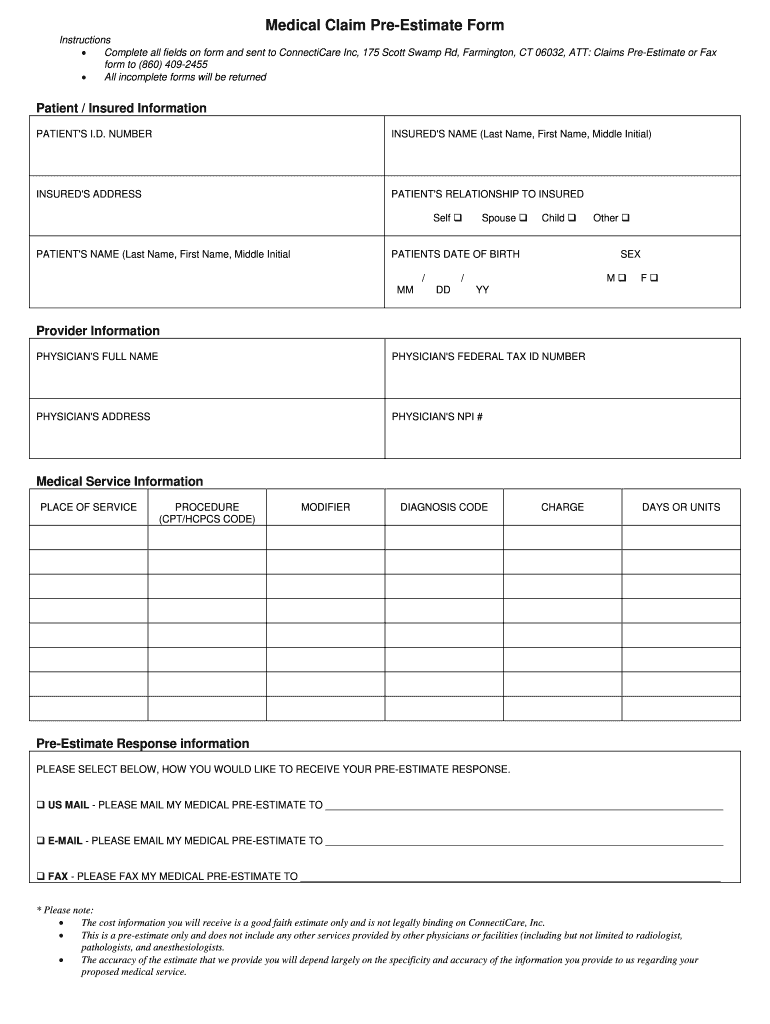
Medical Claim Pre-Estimate Form Instructions Complete all fields on form and sent to ConnectiCare Inc, 175 Scott Swamp Rd, Farmington, CT 06032, ATT: Claims Pre-Estimate or Fax form to (860) 409-2455.
Loading

Open form follow the instructions

Easily sign the form with your finger

Send filled & signed form or save
How to fill out the Medical Claim Pre-Estimate Form - ConnectiCare online
The Medical Claim Pre-Estimate Form from ConnectiCare is designed to provide users with a preliminary estimation of medical expenses. By following the detailed instructions below, you can easily complete the form online to ensure accurate processing of your medical claims.
Follow the steps to complete the Medical Claim Pre-Estimate Form online
- Press the ‘Get Form’ button to obtain the Medical Claim Pre-Estimate Form and open it using your preferred editing tool.
- Fill in the required Patient/Insured Information section. This includes the patient's identification number, the insured's full name (last name, first name, and middle initial), as well as their address.
- Specify the patient's relationship to the insured by selecting one of the options provided: Self, Spouse, Child, or Other. Then, enter the patient's name and date of birth.
- Indicate the patient’s sex by selecting Male or Female.
- In the Provider Information section, include the physician's full name, federal tax identification number, address, and National Provider Identifier (NPI) number.
- For the Medical Service Information, provide details such as the place of service, procedure codes (CPT/HCPCS), any modifiers, diagnosis code, charge amount, and the number of days or units required.
- In the Pre-Estimate Response Information section, choose how you would prefer to receive your pre-estimate response: via US Mail, e-mail, or fax. Fill in the respective contact information accordingly.
- Review all the entered information for accuracy and completeness. Remember that incomplete forms will be returned.
- Once all sections are duly filled out, save your changes. You can then download, print, or share the form as necessary before submitting it to ConnectiCare.
Get started on filing your Medical Claim Pre-Estimate Form online today!
Experience a faster way to fill out and sign forms on the web. Access the most extensive library of templates available.
Related content
Aug 1, 2016 — Health: ConnectiCare Insurance Company, Inc - File Number: 201603295...
by your medical insurance carrier before their 19th birthday for dental benefits or their...
Get answers to your most pressing questions about US Legal Forms API.
What is the limit of textbox in Excel?
The text box that you can insert from the Insert tab of the ribbon has a hard limit of 255 characters if it is linked to a cell. You cannot change that. As an alternative, you can use an ActiveX text box: on the Developer tab of the ribbon, in the Controls group, click Insert.
How do I insert a long text footer in Excel?
On the Insert tab, in the Text group, click Header & Footer. Excel displays the worksheet in Page Layout view. To add or edit a header or footer, click the left, center, or right header or footer text box at the top or the bottom of the worksheet page (under Header, or above Footer). Type the new header or footer text.
What is the maximum character limit for TextBox?
The default is 32767.
How do I remove extra spaces in a footer in Word?
For the most part it is these two settings—Bottom on the Margins tab and Footer on the Layout tab—that together define the distance between the body text and the footer text. You can reduce the distance between the text and the footer by decreasing the Bottom setting and/or increasing the Footer setting.
What is the limit of text string in Excel footer?
However, there is a limit to the number of characters the header or footer will accommodate. Excel will reject an entry of more than 255 characters. Most of the time, the limit isn't a problem. But when you run into a situation that requires more text, you can insert it as a graphic in 10 easy steps.
Is there a maximum character limit in Excel?
Excel has a limit of 32,767 characters per cell. This means that you can enter up to 32,767 characters in a single cell, including spaces, numbers, and special characters. However, it is important to note that this limit applies to the total number of characters in a cell, not just the text that is visible in the cell.
Are text values limited to 255 in Excel?
Text values in formulas are limited to 255 characters. To create text values longer than 255 characters in a formula, use the CONCATENATE function or the concatenation operator (&).
How do I reduce the header and footer space in Word?
How to reduce the size of the header in Microsoft Word The header size can be adjusted by going to 'Page Layout', 'Margins' and selecting 'Custom Margins' Alternatively the header size can be changed by double clicking on the top section of the Word document and changing the Header from Top value.
How do I get rid of extra space in the footer in Word?
For the most part it is these two settings—Bottom on the Margins tab and Footer on the Layout tab—that together define the distance between the body text and the footer text. You can reduce the distance between the text and the footer by decreasing the Bottom setting and/or increasing the Footer setting.
How do I remove extra spaces in header and footer?
On the “Layout” tab, in the “Margins” menu (found on the far left of the navigation bar), click “Custom Margins.” A “Page Setup” menu will appear. Under the “Layout” tab of this pop-up menu, make sure “Vertical alignment” is set to “Top.” Make sure you don't have extra space in the header.
Use professional pre-built templates to fill in and sign documents online faster. Get access to thousands of forms.
If you believe that this page should be taken down, please follow our DMCA take down process here.