Loading
Form preview
  • US Legal Forms
  • Form Library
  • More Forms
  • More Uncategorized Forms
  • Ded 941 Tif

Get Ded 941 Tif

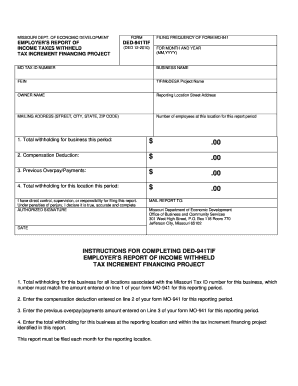
MISSOURI DEPT. OF ECONOMIC DEVELOPMENT FORM EMPLOYER S REPORT OF INCOME TAXES WITHHELD TAX INCREMENT FINANCING PROJECT DED-941TIF FILING FREQUENCY OF FORM MO-941 DED 12-2010 FOR MONTH AND YEAR MM YYYY MO TAX ID NUMBER BUSINESS NAME FEIN TIF/MoDESA Project Name OWNER NAME Reporting Location Street Address MAILING ADDRESS STREET CITY STATE ZIP CODE Number of employees at this location for this report period 1.

How it works

  1. Open form

    Open form follow the instructions

  2. Easily sign form

    Easily sign the form with your finger

  3. Share form

    Send filled & signed form or save

How to fill out the Ded 941 Tif online

The Ded 941 Tif is an essential document for employers involved in tax increment financing projects in Missouri. This guide provides clear and supportive instructions on how to complete the form efficiently online.

Follow the steps to complete the Ded 941 Tif online.

  1. Click 'Get Form' button to obtain the form and open it in the editor.
  2. Enter the reporting month and year in the format MM,YYYY at the top section of the form.
  3. Provide your Missouri tax ID number in the designated field, ensuring it matches the MO-941 form.
  4. Fill in your business name and Federal Employer Identification Number (FEIN).
  5. Specify the TIF/MoDESA project name related to your report in the corresponding field.
  6. Complete the owner name and input the reporting location street address.
  7. Input the mailing address, including street, city, state, and zip code, for correspondence.
  8. Indicate the number of employees at this location for the reporting period.
  9. Report the total withholding for your business this period in the allocated field.
  10. Enter the compensation deduction for the period as derived from your previous filings.
  11. Record any previous overpayment or payments made in the relevant field.
  12. Calculate and fill in the total withholding for this location during the reporting period.
  13. Confirm your direct control, supervision, or responsibility for filing this report and sign in the authorized signature section.
  14. Finally, save your changes, download, print, or share the form as needed.

Complete your Ded 941 Tif form online today for accurate and timely reporting.

Get form

Experience a faster way to fill out and sign forms on the web. Access the most extensive library of templates available.
Get form

Related content

DED-941 FillablePDF Document - Missouri Department...
Instructions for completing DED-941TIF: 1. Enter the number of...
Learn more
Antireflux Transoral Incisionless Fundoplication...
cisionless fundoplication (TIF) procedure were developed based on the current ... ded in...
Learn more
L3 Technologies 0ATN01 Aid to Navigation (AtoN)...
Phone: (941) 371–0811. FAX: (941) 377–5591. Marine ... reasons may be returned...
Learn more

Related links form

Paying For Higher Education Note Taking Guide USPS IMpb Service Type Codes Effective Date 05/31/2015 Status ... - Ribbs Usps Blood Chem Bonus.pdf EL CENTRITO FAMILY LEARNING CENTERS

Questions & Answers

Get answers to your most pressing questions about US Legal Forms API.

Contact support

Move a page break On the View menu, click Normal. Rest the pointer on the page break line until the pointer changes to a. , and then drag the page break line to a new location. Note: When you move an automatic page break, it changes to a manual page break. Manual page breaks are not adjusted automatically.

The page-break-before property adds a page-break before a specified element.. Tip: The properties: page-break-before, page-break-after and page-break-inside help to define how a document should behave when printed. Note: You cannot use this property on an empty <div> or on absolutely positioned elements.

How to add page breaks to html It's done via CSS (inline or in a stylesheet) by adding 'page-break-after: always' to a paragraph at the bottom of your page (above where you intend to break). ... If you use a stylesheet, use print media query to wrap the CSS for printers.

In order to prevent a table to be split in several pages it is required to apply the page-break-inside and page-break-after styles to all of its contents. This trick works unless the table occupies more space than a full page. It is also possible to use custom styles.

The @media print rule specifies print-specific styles that will be applied when the <table> is printed. Within this rule, we set page-break-inside: avoid; on the table element to prevent the table from being split across pages.

This can be done by adding the height attribute in the tr tag. If the height is not specified, the height of the row changes ing to the content. The height can be specified either in pixels, or percentage.

Page breaks are used to end a page without filling it with text. To make sure the title page of your thesis/dissertation is separate from the signature page, for example, insert a page break after the graduation date on the title page.

To suggest a page break, add <P style="page-break-before: always"> before the beginning of a new printed page. For example, if you place the following tags on a HTML page and print it using a compatible browser, you will end-up with three pages with the sample text.

Get This Form Now!

Use professional pre-built templates to fill in and sign documents online faster. Get access to thousands of forms.
Get form
If you believe that this page should be taken down, please follow our DMCA take down processhere.
Get Ded 941 Tif
Get form
  • Adoption
  • Bankruptcy
  • Contractors
  • Divorce
  • Home Sales
  • Employment
  • Identity Theft
  • Incorporation
  • Landlord Tenant
  • Living Trust
  • Name Change
  • Personal Planning
  • Small Business
  • Wills & Estates
  • Packages A-Z
  • Affidavits
  • Bankruptcy
  • Bill of Sale
  • Corporate - LLC
  • Divorce
  • Employment
  • Identity Theft
  • Internet Technology
  • Landlord Tenant
  • Living Wills
  • Name Change
  • Power of Attorney
  • Real Estate
  • Small Estates
  • Wills
  • All Forms
  • Forms A-Z
  • Form Library
  • Legal Hub
  • About Us
  • Help Portal
  • Legal Resources
  • Blog
  • Affiliates
  • Contact Us
  • Delete My Account
  • Site Map
  • Industries
  • Forms in Spanish
  • Localized Forms
  • State-specific Forms
  • Forms Kit
  • Real Estate Handbook
  • All Guides
  • Notarize
  • Incorporation services
  • For Consumers
  • For Small Business
  • For Attorneys
  • USLegal
  • FormsPass
  • pdfFiller
  • signNow
  • altaFlow
  • DocHub
  • Instapage
Form Packages
  • Adoption
  • Bankruptcy
  • Contractors
  • Divorce
  • Home Sales
  • Employment
  • Identity Theft
  • Incorporation
  • Landlord Tenant
  • Living Trust
  • Name Change
  • Personal Planning
  • Small Business
  • Wills & Estates
  • Packages A-Z
Form Categories
  • Affidavits
  • Bankruptcy
  • Bill of Sale
  • Corporate - LLC
  • Divorce
  • Employment
  • Identity Theft
  • Internet Technology
  • Landlord Tenant
  • Living Wills
  • Name Change
  • Power of Attorney
  • Real Estate
  • Small Estates
  • Wills
  • All Forms
  • Forms A-Z
  • Form Library
Customer Service
  • Legal Hub
  • About Us
  • Help Portal
  • Legal Resources
  • Blog
  • Affiliates
  • Contact Us
  • Delete My Account
  • Site Map
  • Industries
  • Forms in Spanish
  • Localized Forms
  • State-specific Forms
  • Forms Kit
Legal Guides
  • Real Estate Handbook
  • All Guides
Prepared for you
  • Notarize
  • Incorporation services
Our Customers
  • For Consumers
  • For Small Business
  • For Attorneys
Our Sites
  • USLegal
  • FormsPass
  • pdfFiller
  • signNow
  • altaFlow
  • DocHub
  • Instapage
Social Media
Call us now toll free:
+1 833 426 79 33
As seen in:
© Copyright 1999-2026 airSlate Legal Forms, Inc. 17 Station Street, Suite 303, Brookline, MA 02445
  • Your Privacy Choices
  • Terms of Service
  • Privacy Notice
  • Content Takedown Policy
  • Bug Bounty Program