Loading
Get Wcr Form Completion Instructions - Wallwork Group
How it works
-

Open form follow the instructions
-

Easily sign the form with your finger
-

Send filled & signed form or save
How to fill out the WCR Form Completion Instructions - Wallwork Group online
Filling out the WCR form for warranty claims with Wallwork Group is essential for a smooth and efficient claims process. This guide will provide clear and detailed instructions to help you complete the form accurately and effectively.
Follow the steps to complete the WCR form successfully.
- Press the 'Get Form' button to access the WCR form and open it in the editor.
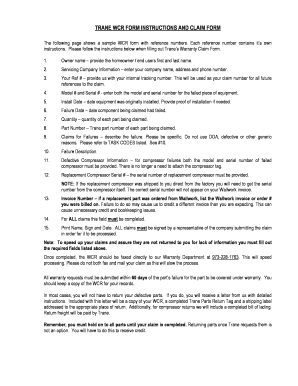
- Owner name: Input the full name of the owner or end user of the equipment, including their first and last name.
- Servicing Company Information: Fill in your company's name, address, and phone number for contact purposes.
- Your Ref #: Enter your internal tracking number that will be used as the claim number for all future correspondence regarding the claim.
- Model # and Serial #: Provide both the model number and serial number of the malfunctioning equipment.
- Install Date: Indicate the date the equipment was originally installed. Attach proof of installation if necessary.
- Failure Date: Specify the date when the component you are claiming failed.
- Quantity: State how many of each part you are claiming under this warranty.
- Part Number: Include the Trane part number for each part being claimed.
- Claims for Failures: Clearly describe the failure experienced. Avoid generic terms such as DOA or defective; instead, use specific references from the task codes provided.
- Failure Description: Fill in any detailed descriptions or additional comments related to the failure.
- Defective Compressor Information: For claims related to compressor failures, provide both the model and serial number of the failed compressor. It is unnecessary to attach the compressor tag.
- Replacement Compressor Serial #: If applicable, include the serial number of the replacement compressor, noting that it may differ from your Wallwork invoice.
- Invoice Number: If you ordered a replacement part from Wallwork, enter the corresponding Wallwork invoice or order number to avoid confusion in processing.
- Signature: Print your name, sign, and date the form. All claims must be signed by a representative from your company for processing.
- Once the form is fully completed, fax it directly to the Warranty Department at 973-228-1763 to expedite processing. Avoid submitting the claim by both fax and mail as this will delay your claim.
- Ensure your warranty requests are submitted within 60 days of the part's failure for coverage under warranty.
- Keep a copy of the completed WCR form for your records.
Complete your WCR form online to ensure a quick and efficient claims process.