Loading
Get 605-1096 Wa Ka Enroll App.qxd
How it works
-

Open form follow the instructions
-

Easily sign the form with your finger
-

Send filled & signed form or save
How to use or fill out the 605-1096 WA KA Enroll App.qxd online
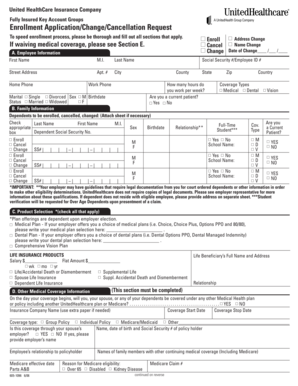
Filling out the 605-1096 WA KA Enroll App online is a straightforward process that allows users to enroll in or make changes to their insurance coverage. This guide provides detailed instructions to ensure that all necessary information is accurately submitted, facilitating a smooth enrollment experience.
Follow the steps to complete your enrollment application online.
- Click ‘Get Form’ button to obtain the form and open it in the editor.
- Begin with section A, where you will provide your employee information, including your first name, last name, and contact details. Ensure that all mandatory fields, such as your Social Security number or employee ID and home phone number, are completed.
- Proceed to section B, which asks for information about any dependents you wish to enroll, cancel, or change. Complete all relevant fields, making note of any dependents and their details. If you have more dependents than the form allows, attach an additional sheet.
- In section C, select the medical and dental plans that apply to you, if your employer offers options. Clearly indicate your choices in the provided spaces.
- In section D, answer questions about any other medical coverage you, your spouse, or dependents may have. This includes details about insurance providers and coverage dates.
- Section E allows you to waive medical coverage if applicable. Check the appropriate box and briefly explain your reason for waiving coverage. Remember to sign and date this section.
- Review the signature section carefully. Complete the affirmation declaration, ensuring that all participants sign as necessary. This affirms that all provided information is complete and accurate.
- Once all sections have been filled out thoroughly, save your changes. You can then download, print, or share the form for submission as needed.
Complete your enrollment application online today to secure your coverage.
No, you can't secretly view highlight stories. However, there is a way to see someone's Story without specifically getting identified. You can create a new Instagram account and watch the Highlight from that newly made account. They can't prove it's you unless you use your likeness.
Industry-leading security and compliance
US Legal Forms protects your data by complying with industry-specific security standards.
-
In businnes since 199725+ years providing professional legal documents.
-
Accredited businessGuarantees that a business meets BBB accreditation standards in the US and Canada.
-
Secured by BraintreeValidated Level 1 PCI DSS compliant payment gateway that accepts most major credit and debit card brands from across the globe.