Loading
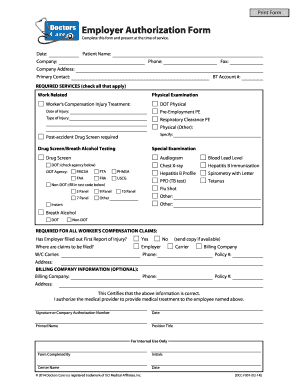
Get Employer Forms - Doctors Care
How it works
-

Open form follow the instructions
-

Easily sign the form with your finger
-

Send filled & signed form or save
How to fill out the Employer Forms - Doctors Care online
Filling out the Employer Forms - Doctors Care online is essential for ensuring that services are rendered efficiently and accurately. This guide provides a comprehensive walkthrough of each section of the form, allowing users to complete it with confidence.
Follow the steps to complete the Employer Forms - Doctors Care online.
- Click ‘Get Form’ button to obtain the form and open it in the editor.
- Begin by entering the date. This is the date on which the form is filled out, ensuring that it is current and relevant.
- Fill in the patient's name in the designated field. This will help identify the individual receiving services.
- Complete the company details, including the company name and contact information such as phone and fax numbers.
- Provide the company's address. This should include street address, city, state, and ZIP code to ensure accurate communication.
- Identify the primary contact person within the company. Enter their name and contact details to facilitate further correspondence.
- Input the BT account number, if applicable, to link the services to the correct business account.
- Check all the required services that apply by selecting the appropriate options, such as physical examinations, drug screenings, and any special examinations needed.
- If the service involves a worker's compensation injury treatment, indicate the date of the injury and specify the type of injury.
- Complete the agency details if a Department of Transportation (DOT) drug screening is required and check the respective agency.
- Fill in the non-DOT test codes if applicable. This may include panels such as 5 Panel, 9 Panel, etc.
- If required, indicate any special examinations needed, such as audiograms or chest X-rays, by checking the relevant boxes.
- For worker's compensation claims, confirm if the employer has filled out the First Report of Injury. Select 'Yes' or 'No' and provide a copy if available.
- Specify where claims will be filed, whether with the employer or a workers' compensation carrier, providing their contact information.
- Optionally, input billing company information, such as the company name, phone, policy number, and address if applicable.
- Certify that the information provided is correct by signing and dating the form. Include the printed name and position title of the signatory.
- For internal use only: the person who completed the form should enter their initials, the center name, and the date when the form was completed.
- Finally, review the completed form for any errors or omissions before saving changes, downloading, printing, or sharing the form as needed.
Complete your Employer Forms - Doctors Care online today to ensure prompt and accurate processing.
In order for your settlement to grow you need to make sure that existing settlers have everything they need. In a building menu, there are stats on the top of the screen. You don't need to maintain all of them but there are a few key ones: Beds, Food, Water, Defense.