Loading
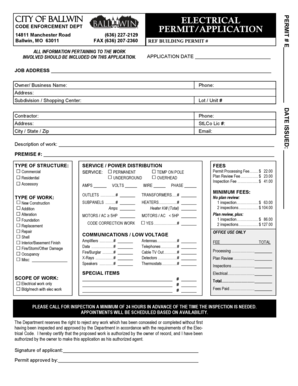
Get Electrical Permit/application - City Of Ballwin
How it works
-

Open form follow the instructions
-

Easily sign the form with your finger
-

Send filled & signed form or save
How to fill out the ELECTRICAL PERMIT/APPLICATION - City Of Ballwin online
This guide provides a clear and supportive approach to completing the ELECTRICAL PERMIT/APPLICATION for the City of Ballwin online. By following these detailed steps, users can efficiently fill out the form to ensure all required information is accurately submitted.
Follow the steps to complete your application seamlessly.
- Press the ‘Get Form’ button to obtain the ELECTRICAL PERMIT/APPLICATION form and open it in your preferred editor.
- Enter the application date in the specified field to indicate when the application is being submitted.
- Fill in the job address where the electrical work will take place, ensuring accuracy in the location details.
- Provide the owner or business name in the designated section, along with a contact phone number and address.
- If applicable, include the subdivision or shopping center name, as well as the lot or unit number.
- Enter the contractor's details including their name, phone number, and address, ensuring this information is correct.
- Input the StLCo license number for verification purposes.
- Provide a brief description of the electrical work to be undertaken in the corresponding field.
- Select the type of structure from the options provided, including commercial, residential, or accessory.
- Indicate the type of work being done by selecting from options such as new construction, alteration, or repair.
- Detail the scope of work, specifying if it involves electrical work only or if it includes building/mechanical work.
- Fill in the service and power distribution section with relevant information regarding service type, amps, and volts.
- List the number of outlets, transformers, and subpanels involved in the project, specifying their respective amperages.
- If applicable, include details regarding heaters, motors, and code correction work as required.
- Indicate any special items and their associated fees, ensuring all costs are accurately recorded.
- Refer to the fee schedule and select the appropriate fees for your application, summing total costs accurately.
- Complete the signature section where the applicant certifies the proposed work is authorized by the owner.
- Finally, review the entire application for completeness and accuracy, then save the changes, download, print, or share the completed form as needed.
Start your application for the ELECTRICAL PERMIT online today and ensure all required details are submitted correctly!
The property owner or a contractor licensed by the State of California can obtain permits. Tenants may obtain a permit if they have the written permission of the property owner and the property owner signs the permit documents. It is always best if a licensed contractor obtains the permit.
Industry-leading security and compliance
US Legal Forms protects your data by complying with industry-specific security standards.
-
In businnes since 199725+ years providing professional legal documents.
-
Accredited businessGuarantees that a business meets BBB accreditation standards in the US and Canada.
-
Secured by BraintreeValidated Level 1 PCI DSS compliant payment gateway that accepts most major credit and debit card brands from across the globe.