Loading
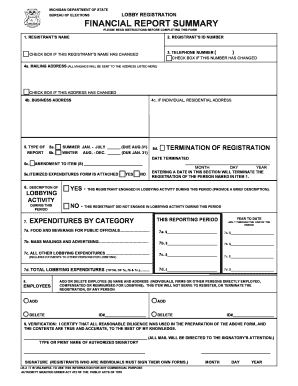
Get Lobby Financial Report Summary Form And ... - State Of Michigan - Mich
How it works
-

Open form follow the instructions
-

Easily sign the form with your finger
-

Send filled & signed form or save
How to fill out the Lobby Financial Report Summary Form And ... - State Of Michigan - Mich online
This guide provides a step-by-step approach to filling out the Lobby Financial Report Summary Form as required by the State of Michigan. It is essential for registrants to complete this form accurately and on time to ensure compliance with state regulations.
Follow the steps to complete the form effectively.
- Click the ‘Get Form’ button to access the Lobby Financial Report Summary Form and open it for editing.
- In Item 1, enter the registrant's name exactly as it appears on the previous filings. If there has been a name change, select the checkbox to indicate this change.
- In Item 2, input the registrant’s unique identification number, which is crucial for tracking and identification purposes.
- Provide the registrant’s telephone number in Item 3 and check the box if this number has changed since the last report.
- Fill out the mailing address in Item 4a, ensuring it is accurate as all communications will be sent there. Check the box if this address has changed. Also, complete Item 4b with the business address and Item 4c if the registrant is an individual.
- Specify the type of report being filed in Item 5. Indicate if it is the summer or winter report by selecting 5a or 5b respectively. If you are amending a prior report, complete Item 5c.
- Include any necessary information regarding the termination of registration in Item 5d and the effective termination date. Confirm if expenditures have been itemized in Item 5e.
- In Item 6, provide a brief description of lobbying activities for the reporting period and check either 'Yes' or 'No' to indicate whether any lobbying activity occurred.
- For Item 7, report total expenditures in the outlined categories: food and beverage for public officials, mass mailings, and all other lobbying expenditures. Ensure you fill in both the current reporting period totals and year-to-date totals.
- In Item 8, list any individuals, firms, or other entities that have been employed or compensated for lobbying. You may indicate if these names are being added or deleted.
- Finally, sign the report in Item 9, ensuring that you provide an original signature. If applicable, have an authorized representative sign on behalf of the entity.
Complete your Lobby Financial Report Summary Form online today to ensure timely submission and compliance.
All threshold amounts are indexed annually. For 2022 the thresholds are: Organization: More than $2,675 on lobbying in total or more than $675 on lobbying a single public official in a 12-month period. Staff: More than $675 in prorated compensation or reimbursement for lobbying in a 12-month period.
Industry-leading security and compliance
US Legal Forms protects your data by complying with industry-specific security standards.
-
In businnes since 199725+ years providing professional legal documents.
-
Accredited businessGuarantees that a business meets BBB accreditation standards in the US and Canada.
-
Secured by BraintreeValidated Level 1 PCI DSS compliant payment gateway that accepts most major credit and debit card brands from across the globe.