Loading
Get Bdvr 162
How it works
-

Open form follow the instructions
-

Easily sign the form with your finger
-

Send filled & signed form or save
How to fill out the Bdvr 162 online
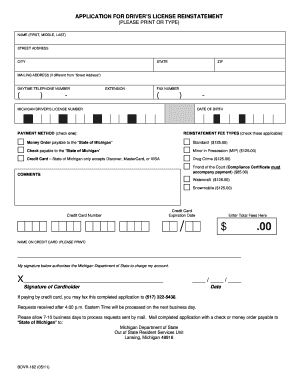
The Bdvr 162 is an application for driver’s license reinstatement in the state of Michigan. This guide provides step-by-step instructions to help users navigate the process of completing the form online, ensuring a seamless experience.
Follow the steps to fill out the Bdvr 162 form online.
- Click ‘Get Form’ button to obtain the application for driver’s license reinstatement and open it in your preferred editor.
- Begin filling out the form by entering your name in the fields for 'First,' 'Middle,' and 'Last' as prompted.
- In the 'Street Address' section, provide your current residential address.
- Next, input your 'City,' 'State,' and 'ZIP' code in the designated fields.
- If your mailing address differs from your street address, fill in the 'Mailing Address' section accordingly.
- Enter your 'Daytime Telephone Number' in the provided field, including the area code.
- Complete the 'Fax Number' section if applicable, including the area code.
- Fill in your Michigan driver's license number and date of birth in the respective fields.
- Select your preferred payment method by checking the appropriate box, and ensure you check all applicable reinstatement fee types.
- If paying by credit card, enter your credit card number and expiration date.
- Calculate the total fees owed and enter it in the 'Enter Total Fees Here' field.
- Print your name as it appears on the credit card in the designated section.
- Sign the form to authorize the Michigan Department of State to charge your account.
- Include the date of your signature.
- If paying by credit card, you may fax the completed application to the designated fax number. Alternatively, you can mail the application with a check or money order.
- Finally, save your changes, download, print, or share the completed form as needed.
Complete your documents online and ensure a smooth driver’s license reinstatement process.
If your reinstatement fee is eligible to be paid online, you will need to: Go to Online Services. In the “Driver's License and ID” section, select “More Driver Services.” Follow the prompts to create or login to your account. In the “Operator License” section, select “More” then select “Pay Reinstatement Fee.”