Loading
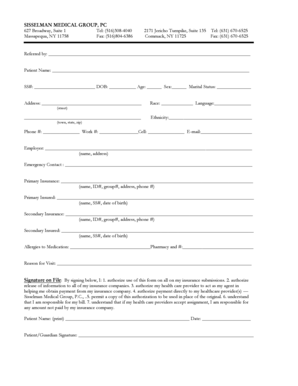
Get New Patient Registration Packet - Sisselman Medical Group
How it works
-

Open form follow the instructions
-

Easily sign the form with your finger
-

Send filled & signed form or save
How to fill out the New Patient Registration Packet - Sisselman Medical Group online
Completing the New Patient Registration Packet for Sisselman Medical Group online is a straightforward process designed to collect essential information about your medical history and insurance details. This guide will walk you through each section of the form to ensure you fill it out accurately and efficiently.
Follow the steps to complete your New Patient Registration Packet.
- Press the ‘Get Form’ button to retrieve the New Patient Registration Packet and open it in the editor.
- Begin by filling out your personal information. This includes your name, Social Security number, date of birth, age, sex, and marital status. Ensure that each field is filled out accurately.
- Provide your address including street, town, state, and zip code. Also, fill in your contact numbers (home, work, and cell) and email address. This information helps us reach you easily.
- Indicate your race and primary language preferences. This information is important for ensuring equitable care.
- Detail your insurance information. Start by filling in your primary insurance provider's name, ID number, group number, address, and phone number. If you have secondary insurance, provide that information in the subsequent fields.
- List the name of the insured for both primary and secondary insurance along with their Social Security number and date of birth.
- Record any known allergies to medication and your preferred pharmacy's name and phone number. This information is crucial for safe medication management.
- State the reason for your visit. This helps us prepare for your appointment effectively.
- In the signature section, authorize the use of this form for insurance submissions, and provide your printed name, signature, and date.
- If applicable, complete section I or II regarding permission to leave information with designated people, and sign. If no information should be shared, fill out section II.
- Review your entire form for accuracy. Once satisfied, you can save changes, download a copy, print it, or share it as necessary.
Complete your New Patient Registration Packet online today for a seamless medical experience.
Watermarks can be used to protect confidential information and to indicate the validity of a legal document. You'll also watermarks any paper banknote, where they're used to help prevent counterfeiting.
Industry-leading security and compliance
US Legal Forms protects your data by complying with industry-specific security standards.
-
In businnes since 199725+ years providing professional legal documents.
-
Accredited businessGuarantees that a business meets BBB accreditation standards in the US and Canada.
-
Secured by BraintreeValidated Level 1 PCI DSS compliant payment gateway that accepts most major credit and debit card brands from across the globe.