Loading
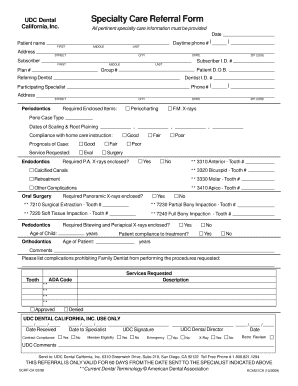
Get Assurant Dental Referral Form
How it works
-

Open form follow the instructions
-

Easily sign the form with your finger
-

Send filled & signed form or save
How to fill out the Assurant Dental Referral Form online
Filling out the Assurant Dental Referral Form online is a straightforward process that helps streamline the referral for specialty dental care. This guide provides clear, step-by-step instructions to assist users in successfully completing the form.
Follow the steps to fill out the Assurant Dental Referral Form online
- Click the ‘Get Form’ button to access the form and open it in your chosen document editor.
- Begin by entering the patient's name in the required fields marked with an asterisk. Include the first name, middle name, and last name.
- Fill in the patient's address details: street address, city, state, and ZIP code.
- Provide the subscriber identification number, date of birth, group number, and plan number in the specified fields.
- Enter the date of filling out the form and the daytime phone number of the patient.
- Indicate the referring dentist's name and their identification number, as well as the dentist's phone number.
- Select the participating specialist related to the type of care being requested, such as periodontics or endodontics.
- Complete the sections regarding required enclosed items, including F.M. X-rays and peri-case type information.
- In the services requested section, choose the necessary services such as evaluation or surgery and provide descriptions where needed.
- Make sure to review the compliance questions regarding patient care instructions and prognosis.
- After filling out all required fields, check for any additional comments and finalize your responses.
- Save changes, download, print or share the form as needed.
Complete your Assurant Dental Referral Form online today for a seamless referral process.
The HTML <Textarea>maxlength attribute is used to specify the maximum number of characters enters into the Textarea element. Attribute Value: number: It contains single value number which allows the maximum number of character in Textarea element. Its default value is 524288.