Loading
Get Loss Or Damage Claim Form - Southwest Airlines Cargo
How it works
-

Open form follow the instructions
-

Easily sign the form with your finger
-

Send filled & signed form or save
How to fill out the LOSS OR DAMAGE CLAIM FORM - Southwest Airlines Cargo online
Filing a loss or damage claim with Southwest Airlines Cargo can be a straightforward process when using the appropriate form. This guide provides clear, step-by-step instructions to assist users in completing the LOSS OR DAMAGE CLAIM FORM effectively.
Follow the steps to complete the claim form online.
- Press the ‘Get Form’ button to obtain the necessary form and open it for completion.
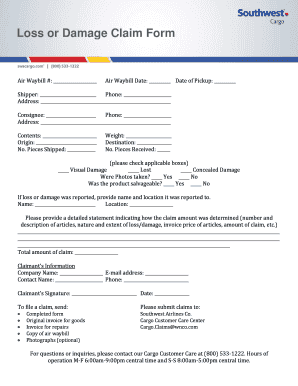
- Fill in the air waybill number and date. Ensure that these details match your shipment records accurately.
- List the contents of the shipment and the origin of the package. Specify the number of pieces shipped and their total weight.
- Indicate the type of issue by checking the applicable boxes for visual damage, loss, or concealed damage. Also, specify if photos were taken and if the product was salvageable.
- Include a detailed statement indicating how the claim amount was determined. This should include the number and description of articles, nature of the loss or damage, invoice price of articles, and amount of the claim.
- Complete the claimant’s information by filling in the company name, email address, contact name, and phone number.
- Sign and date the form where indicated.
- Prepare to submit your claim by collecting the required documents, which include the completed form, original invoice for goods, invoice for repairs, a copy of the air waybill, and optional photographs.
Complete your loss or damage claim form online today to ensure your claim is addressed promptly.
No luck at the gate? Try the baggage claim office. In the event that you don't notice right away that you've left something behind and you're still at the airport, head over to the airline's baggage claim office. Typically, lost items will be sent there once found on the plane.