Loading
Get Stop Work Order Template
How it works
-

Open form follow the instructions
-

Easily sign the form with your finger
-

Send filled & signed form or save
How to fill out the Stop Work Order Template online
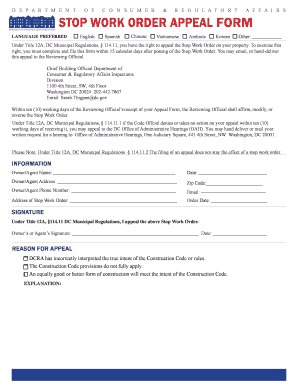
Filling out the Stop Work Order Template is an essential step for users seeking to appeal against construction regulations. This guide provides clear, step-by-step instructions to help you complete the form efficiently and accurately.
Follow the steps to complete the Stop Work Order Template online.
- Click ‘Get Form’ button to obtain the form and open it in the editor.
- Begin by filling out the owner's or agent's name in the designated field. Ensure the name matches the official records related to the property.
- Enter the date of filling the form to provide a timestamp of your appeal.
- Input the owner's or agent's address, including the zip code, ensuring accurate contact information is provided.
- Fill in the phone number and email address where you can be reached for correspondence about your appeal.
- Record the address of the Stop Work Order as noted on the official notice.
- Insert the order date, which indicates when the Stop Work Order was issued.
- Sign the form to affirm your appeal. Make sure to include the date of signing to validate the submission.
- Select the reason for your appeal from the options provided and offer a brief explanation if necessary. This helps clarify your position.
- Once all sections are completed, review your entries for accuracy, then save the form, download, print, or share it as needed.
Start completing your Stop Work Order Template online today.
Here are the most important components of a work order form: Title and description of the task. Name of the customer or business requesting the task. Name of the assigned worker and contact information. Time frame for completion. Priority. Necessary tools or support for completion.