Loading
Get Flagstar Bank Third-party Authorization Form Please ... - Short Sale
How it works
-

Open form follow the instructions
-

Easily sign the form with your finger
-

Send filled & signed form or save
How to fill out the Flagstar Bank Third-Party Authorization Form Please ... - Short Sale online
Completing the Flagstar Bank Third-Party Authorization Form is an essential step for authorizing another individual to access your mortgage information. This guide provides a structured approach to filling out the form accurately and efficiently online.
Follow the steps to complete the third-party authorization form.
- Click ‘Get Form’ button to access the Flagstar Bank Third-Party Authorization Form online.
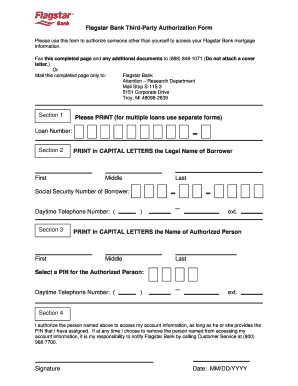
- In Section 1, print the Loan Number. If you have multiple loans, use a separate form for each loan.
- Proceed to Section 2. Here, print in capital letters the legal name of the borrower, including the first, middle (if applicable), and last names. Also, provide the borrower’s social security number and daytime telephone number.
- In Section 3, print in capital letters the name of the authorized person who will have access to your account. Assign a PIN for this person and provide their daytime telephone number.
- Section 4 requires your authorization. Check the box indicating that you authorize the named person to access your account information, ensuring they will provide the assigned PIN. Include your signature and the date of authorization.
- Fill in any borrower financial information required following the prompts on the form, detailing income, expenses, and financial hardship if applicable.
- Ensure all required signatures are included at the end of the form, both from the borrower and co-borrower, if applicable. Make sure to date your signatures appropriately.
- Finally, save your completed form. You can then download, print, or share the completed form via your preferred method.
Complete your Flagstar Bank Third-Party Authorization Form online today to ensure your mortgage information can be accessed by your authorized person.
The Third Party Authorization form authorizes a person other than the payor or recipient to act on the payor's or recipient's behalf. A Family Responsibility Office (FRO) support payor or support recipient may designate this person to request and receive information from the FRO regarding their case.
Industry-leading security and compliance
US Legal Forms protects your data by complying with industry-specific security standards.
-
In businnes since 199725+ years providing professional legal documents.
-
Accredited businessGuarantees that a business meets BBB accreditation standards in the US and Canada.
-
Secured by BraintreeValidated Level 1 PCI DSS compliant payment gateway that accepts most major credit and debit card brands from across the globe.