Loading
Get Coworx Login
How it works
-

Open form follow the instructions
-

Easily sign the form with your finger
-

Send filled & signed form or save
How to fill out the Coworx Login online
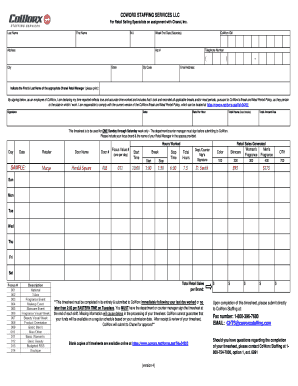
Filling out the Coworx Login form is an essential step for reporting your working hours accurately. This guide provides clear and comprehensive instructions to help you complete the form efficiently and correctly.
Follow the steps to fill out your Coworx Login form accurately.
- Click ‘Get Form’ button to obtain the form and open it in the editor.
- Enter your last name in the designated space to identify yourself on the form.
- Next, input your first name and middle initial in the appropriate fields.
- Provide your CoWorx ID number in the designated section, ensuring all numbers are accurate.
- Fill in the week ending date, selecting the Saturday that corresponds to your reporting period.
- Complete your current address including street, apartment number (if applicable), city, state, and zip code.
- List your telephone number in the given format, ensuring clarity for further communication.
- Input your email address, which will be used for any correspondence related to your timesheet.
- Indicate the first and last name of the Chanel Retail Manager you worked with, ensuring correctness.
- Review the declaration statement, then sign and date the form to confirm that your reported hours are accurate.
- Enter your hourly rate, total hours worked (subtracting breaks), and calculate the total amount due.
- Detail the hours worked each day of the week in the provided format, including start and stop times.
- Record any retail sales generated, ensuring to categorize them accurately by department.
- Ensure you have your departmental or counter manager sign the timesheet before submission.
- Once the form is complete, submit it to CoWorx via fax or email as instructed, ensuring timely processing.
Complete your Coworx Login form online today to ensure timely payment for your work.
3 Answers. As argument, use a function instead a direct value. It works the same, but it prevents to recreate uselessly an array (then fill it), which will be trashed on every render.
Industry-leading security and compliance
US Legal Forms protects your data by complying with industry-specific security standards.
-
In businnes since 199725+ years providing professional legal documents.
-
Accredited businessGuarantees that a business meets BBB accreditation standards in the US and Canada.
-
Secured by BraintreeValidated Level 1 PCI DSS compliant payment gateway that accepts most major credit and debit card brands from across the globe.