Loading
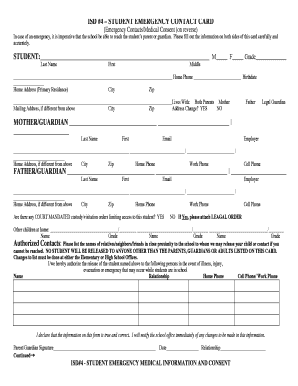
Get Emergency Contact Card - Mcgregor Public Schools - Mcgregor K12 Mn
How it works
-

Open form follow the instructions
-

Easily sign the form with your finger
-

Send filled & signed form or save
How to fill out the Emergency Contact Card - McGregor Public Schools - Mcgregor K12 Mn online
Filling out the Emergency Contact Card for McGregor Public Schools is a crucial step in ensuring your child’s safety while at school. This guide will provide you with clear, step-by-step instructions on how to accurately complete the form online, ensuring that the school has up-to-date emergency contact information.
Follow the steps to accurately complete the Emergency Contact Card online.
- Click ‘Get Form’ button to access the Emergency Contact Card and open it for completion.
- In the section labeled 'STUDENT', provide your child's last name, first name, and middle name. Indicate their gender by selecting either ‘M’ or ‘F’ and enter their grade.
- Fill in the home phone number, birthdate, and primary home address, including city and zip code.
- Indicate who the student lives with by selecting from the options provided (Both Parents, Mother, Father, Legal Guardian). If the mailing address is different, provide it in the designated fields.
- Complete the information for each parent/guardian, including their last name, first name, email, home address (if different), home phone, work phone, employer, and cell phone.
- Answer the question about court-mandated custody or visitation orders, attaching any necessary legal documentation if applicable.
- List any other children that live at home, including their names and grades.
- Identify authorized contacts, including relatives, neighbors, or friends, that are permitted to pick up your child in case of an emergency. Specify their names, relationships, and contact numbers.
- Provide your signature as the parent or guardian, along with the date and your relationship to the student.
- Complete the medical information section by indicating if your child requires medication at school. Fill in all necessary medical information, including any conditions or limitations.
- Sign and date the Emergency Treatment Authorization section, specifying the preferred hospital for emergency care.
- Finally, input health insurance information, including the type of coverage and details of your physician and dentist.
- Once all sections are filled out, save changes, and ensure the form is downloaded, printed, or shared as needed.
Complete your Emergency Contact Card online today to ensure your child's safety!
An org can't have more than 900 custom fields on most object types, regardless of the edition or source of those fields.
Industry-leading security and compliance
US Legal Forms protects your data by complying with industry-specific security standards.
-
In businnes since 199725+ years providing professional legal documents.
-
Accredited businessGuarantees that a business meets BBB accreditation standards in the US and Canada.
-
Secured by BraintreeValidated Level 1 PCI DSS compliant payment gateway that accepts most major credit and debit card brands from across the globe.