Loading
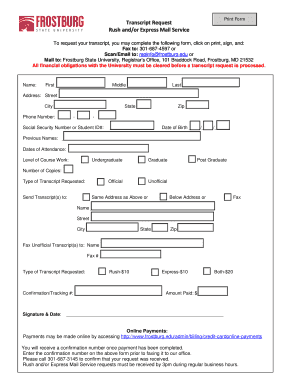
Get Transcript Request Rush And/or Express Mail Service - Frostburg
How it works
-

Open form follow the instructions
-

Easily sign the form with your finger
-

Send filled & signed form or save
How to fill out the Transcript Request Rush And/or Express Mail Service - Frostburg online
This guide provides clear and comprehensive instructions on completing the Transcript Request Rush And/or Express Mail Service form for Frostburg State University online. Follow the steps carefully to ensure that your transcript request is processed efficiently.
Follow the steps to successfully complete your transcript request
- Click ‘Get Form’ button to access the Transcript Request Rush And/or Express Mail Service form and open it in your preferred document editor.
- Begin by entering your personal information in the designated fields, including your first name, middle name (if applicable), and last name.
- Provide your complete address, including street, city, state, and zip code, ensuring all information is accurate for mail delivery.
- Fill out your phone number, including area code, in the format ___-___-____.
- Enter either your social security number or student ID number in the specified field.
- Input your date of birth in the format __/__/. This information is necessary for verifying your identity.
- List any previous names you have used, if applicable, to assist in locating your records.
- Indicate your dates of attendance at the university, specifying the start and end dates.
- Select the level of course work you completed: undergraduate, graduate, official, unofficial, or post-graduate.
- Specify the number of copies of your transcript you wish to request.
- Choose how you want your transcript sent: to the same address provided above, a different address, or via fax, filling out the relevant fields accordingly.
- If sending by fax, provide the name and fax number of the recipient.
- Select the type of transcript you are requesting and note the associated fees: Rush-$10, Express-$10, or Both-$20.
- Enter the confirmation/tracking number from your payment and the total amount paid in the designated fields.
- Sign and date the form to validate your request.
- Once all fields are complete, save your changes. You can download, print, and share the form as needed. Remember to fax, scan/email, or mail the form to the Registrar’s Office.
Complete your transcript request online today to ensure efficient processing.
If you are requesting that a transcript be sent to anyone other than yourself, we recommend that you complete the Attention field. The delivery of transcripts sent to a business, organization, or corporation can be delayed if you do not provide the name of the specific recipient.
Industry-leading security and compliance
US Legal Forms protects your data by complying with industry-specific security standards.
-
In businnes since 199725+ years providing professional legal documents.
-
Accredited businessGuarantees that a business meets BBB accreditation standards in the US and Canada.
-
Secured by BraintreeValidated Level 1 PCI DSS compliant payment gateway that accepts most major credit and debit card brands from across the globe.