Loading
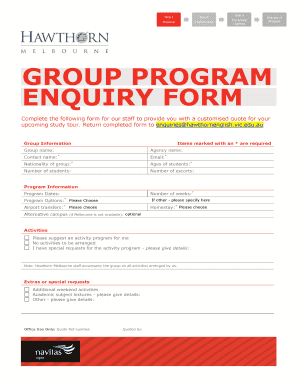
Get Download The Study Tour Enquiry Form
How it works
-

Open form follow the instructions
-

Easily sign the form with your finger
-

Send filled & signed form or save
How to fill out the Download The Study Tour Enquiry Form online
Filling out the Download The Study Tour Enquiry Form online is a straightforward process designed to assist you in providing essential information for your upcoming study tour. This guide will help you navigate each section of the form with ease.
Follow the steps to complete your enquiry form efficiently.
- Click the ‘Get Form’ button to access the form and open it in the available editor.
- Begin by filling out the group information. Enter the group name, agency name, contact name (this field is required), email address (required), nationality of the group (required), ages of the students (required), number of students, and number of escorts.
- Proceed to the program information section. Specify the number of weeks (required) for the program. Fill in the desired program dates and select program options from the provided choices. Indicate if airport transfers are necessary.
- If your group opts for an alternative campus or has other preferences, please specify in the designated fields. For homestay options, select your choice and note any alternative campus if Melbourne is unavailable.
- In the activities section, you can suggest an activity program or indicate if no activities should be arranged. Include any special requests for the activity program in the provided details section, if applicable.
- Finally, provide any additional requests or extras, such as additional weekend activities, academic subject lectures, or any other details that should be considered.
- After ensuring all required fields are filled out, review your information for accuracy. You can then save changes, download, print, or share the completed form as necessary.
Complete your Download The Study Tour Enquiry Form online today to get started on your study tour planning!
How to Make Graph Paper in Excel Change to “Page Layout” View. Open a new empty Excel sheet. ... Select all cells. In the upper left corner of the sheet select the half triangle button. ... Format the Column Width. ... Adjust the Row Height. ... Return to 'Normal' Page View (Optional)
Industry-leading security and compliance
US Legal Forms protects your data by complying with industry-specific security standards.
-
In businnes since 199725+ years providing professional legal documents.
-
Accredited businessGuarantees that a business meets BBB accreditation standards in the US and Canada.
-
Secured by BraintreeValidated Level 1 PCI DSS compliant payment gateway that accepts most major credit and debit card brands from across the globe.