Loading
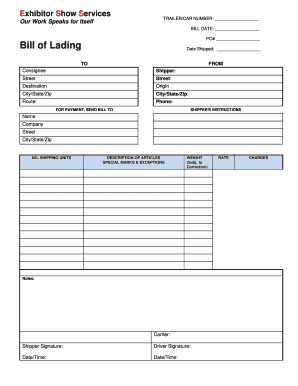
Get Bill Of Lading (pdf Form) - Exhibitor Show Services
How it works
-

Open form follow the instructions
-

Easily sign the form with your finger
-

Send filled & signed form or save
How to fill out the Bill Of Lading (PDF Form) - Exhibitor Show Services online
Filling out the Bill Of Lading is an important step in ensuring that your shipments are processed smoothly. This guide will provide you with clear, step-by-step instructions to complete the Bill Of Lading online, ensuring accuracy and efficiency.
Follow the steps to fill out the Bill Of Lading correctly online.
- Click the ‘Get Form’ button to obtain the form and open it in your preferred PDF editor.
- Enter the trailer or car number in the designated field labeled 'TRAILER/CAR NUMBER'.
- Fill in the 'BILL DATE' with the current date when you are completing the form.
- In the 'PO#' section, specify the purchase order number relevant to your shipment.
- Under 'Date Shipped,' indicate the actual date when the shipment will be sent out.
- Complete the 'TO' section with the consignees' details, including name, company, street address, city, state, and zip code.
- Fill in the 'FROM' section with the shipper's details in a similar format as the consignee.
- In the 'Destination' and 'Origin' fields, provide the destination and origin addresses, respectively.
- Specify the 'Route' that the shipment will take.
- Include a contact number in the 'Phone' section.
- For payment instructions, fill out the 'FOR PAYMENT, SEND BILL TO' section with the name, company, street, city, state, and zip of the invoice recipient.
- Indicate the total number of shipping units in the 'NO. SHIPPING UNITS' section.
- Describe the articles being shipped in the 'DESCRIPTION OF ARTICLES' field.
- List any special marks or exceptions concerning the shipment in the 'SPECIAL MARKS & EXCEPTIONS' field.
- Enter the total weight in the appropriate field, keeping in mind it is subject to correction.
- Under 'Carrier,' write the name of the transportation company handling your shipment.
- Provide the shipper's signature to authorize the shipment.
- The driver must also sign and date the form in the designated section.
- Finally, save your changes, download the document, and if needed, print or share it as per your requirements.
Complete your Bill Of Lading online today for a seamless shipping experience.
P Pass No grade point credit. Applies only to nondevelopmental studies courses. Pass grades carry academic credit but are not included within GPA calculations.
Industry-leading security and compliance
US Legal Forms protects your data by complying with industry-specific security standards.
-
In businnes since 199725+ years providing professional legal documents.
-
Accredited businessGuarantees that a business meets BBB accreditation standards in the US and Canada.
-
Secured by BraintreeValidated Level 1 PCI DSS compliant payment gateway that accepts most major credit and debit card brands from across the globe.