We use cookies to improve security, personalize the user experience, enhance our marketing activities (including cooperating with our marketing partners) and for other business use.
Click "here" to read our Cookie Policy. By clicking "Accept" you agree to the use of cookies. Read less
Read more
Accept
Loading
Form preview
  • US Legal Forms
  • Form Library
  • More Forms
  • More Uncategorized Forms
  • Form 102 Gp

Get Form 102 Gp

Hat in case of demise of the subscriber after opting for phased withdrawal, all the outstanding pension wealth out of the phased lump sum withdrawal in the account of the subscriber will be paid to the nominee(s) as mentioned in this form and the same would be treated as full and final discharge of the obligation. In case, if you wish to appoint multiple nominees, please fill in the form 401-AN. I, hereby nominate the person(s) mentioned below who is/are memb.

How it works

  1. Open form

    Open form follow the instructions

  2. Easily sign form

    Easily sign the form with your finger

  3. Share form

    Send filled & signed form or save

How to fill out the Form 102 Gp online

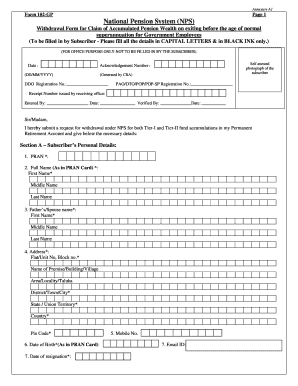
This guide provides step-by-step instructions on how to accurately fill out the Form 102 Gp online, designed for individuals seeking to withdraw their pension wealth prior to reaching normal retirement age. The aim is to simplify the submission process and ensure all necessary details are correctly provided.

Follow the steps to complete the Form 102 Gp successfully.

  1. Click ‘Get Form’ button to obtain the form and open it for completion.
  2. Begin by entering the date in the format DD/MM/YYYY at the specified section of the form.
  3. Include a self-attested photograph in the designated area.
  4. In Section A, provide your personal details accurately. Fill out your PRAN number, full name as it appears on the PRAN card, along with your father’s or spouse's name.
  5. Complete your address details, ensuring that you include all mandatory fields such as flat/unit number, building name, area, city, state, and pin code.
  6. Enter your date of birth and resignation date as stipulated.
  7. In Section B, indicate the amount you wish to withdraw from your Tier-I account and provide the appropriate percentage to be allocated for life annuity.
  8. For your Tier-II account, acknowledge that it will be treated as one total payout alongside your Tier-I withdrawal.
  9. Section C requires you to fill out your bank details for electronic fund transfers, including providing a cancelled cheque or bank certificate as proof.
  10. Specify your annuity service provider details in Section D, including the ASP name and IDs.
  11. Read through the declaration statement and sign/initial where required, ensuring that thumb impressions are added if applicable.
  12. If you have nominees, fill in the nomination details as instructed, ensuring correct percentages and information.
  13. Once all sections are completed, you can save changes to your form, and proceed to download, print, or share it as necessary.

Start completing your Form 102 Gp online today to ensure a seamless withdrawal of your pension wealth.

Get form

Experience a faster way to fill out and sign forms on the web. Access the most extensive library of templates available.
Get form

Related content

Water Discharge Permits and General Permits...
Attachment E: Coastal Consistency Review Form (DEEP-APP-004) ... Permit or Other...
Learn more
Banner General Person Data Entry Standards &...
Class Scope – GP Update (GP102). • How to ... Forms used to enter GP data. –...
Learn more
BM FORM.102 PG BUTLER 3450 M FORM 102...
BM FORM.102 PG BUTLER 3450 M FORM 102. User Manual: BUTLER 3450. Open the PDF ... UP TO 10...
Learn more

Related links form

Oklahoma Board Of Nursing New Jersey Turnpike - Nj 1 824 Form Award Letter Chemung.docx CONTRACT AWARD LETTER March ... - Ogs Ny

Questions & Answers

Get answers to your most pressing questions about US Legal Forms API.

Contact support

Go to site .enps.nsdl.com and select Registration option and go to New Registration and choose appropriate options. You must have an 'Aadhaar number' (with a mobile number registered with Aadhaar). Your KYC in NPS will be done using Aadhaar through One Time Password (OTP) authentication.

Following documents are required to be submitted alongwith the duly filled Withdrawal form for Superannuation & Pre-mature Exit: Original PRAN card. Advanced stamped receipt, to be duly filled and cross-signed on the Revenue stamp by the Subscriber. KYC documents (address and photo-id proof)

In order to withdraw from Tier II account, the subscriber needs to submit a duly filled UOS-S12 to the associated POP-SP. On T+3 days, (T being the date of processing) the funds shall be transferred from the Trustee Bank to subscriber's bank account as registered in the CRA system.

Partial withdrawal request can be initiated online by Subscriber. Alternatively, Subscriber can submit physical partial withdrawal form (601-PW) along with documents to POP, based on which POP can initiate online request.. However, POP is required to 'Authorize' the Withdrawal request in CRA system.

A subscriber can make partial withdrawal after joining the NPS after 10 years, not exceeding twenty-five per cent of the contributions made by him/her and excluding contribution made by employer, if any, at any time before exit from National Pension System subject to the terms and conditions, purpose, frequency and ...

Form 102GP – NPS withdrawal form can be used by government employees who wish to withdraw their accumulated pension before retirement. Form 302 – This form can be used by corporate employees and other citizens who wish to withdraw their accumulated pension before retirement.

The Nominee/Claimant is required to submit duly filled-up Death Withdrawal Form alongwith supporting documents such as [Death Certificate deceased Subscriber, KYC Documents (Identity & Address Proof), Bank Account Proof and other required documents]. The list of documents required is given in Death Withdrawal Form.

The online withdrawal process can be initiated in either of the two ways: By subscriber using User ID & IPIN: The subscriber can directly initiate withdrawal application using his/her User ID & IPIN in the CRA system with in a period of 6 months before the age of superannuation/vesting date opted by subscriber.

Get This Form Now!

Use professional pre-built templates to fill in and sign documents online faster. Get access to thousands of forms.
Get form
If you believe that this page should be taken down, please follow our DMCA take down processhere.

Industry-leading security and compliance

US Legal Forms protects your data by complying with industry-specific security standards.
  • In businnes since 1997
    25+ years providing professional legal documents.
  • Accredited business
    Guarantees that a business meets BBB accreditation standards in the US and Canada.
  • Secured by Braintree
    Validated Level 1 PCI DSS compliant payment gateway that accepts most major credit and debit card brands from across the globe.
Get Form 102 Gp
Get form
Form Packages
Adoption
Bankruptcy
Contractors
Divorce
Home Sales
Employment
Identity Theft
Incorporation
Landlord Tenant
Living Trust
Name Change
Personal Planning
Small Business
Wills & Estates
Packages A-Z
Form Categories
Affidavits
Bankruptcy
Bill of Sale
Corporate - LLC
Divorce
Employment
Identity Theft
Internet Technology
Landlord Tenant
Living Wills
Name Change
Power of Attorney
Real Estate
Small Estates
Wills
All Forms
Forms A-Z
Form Library
Customer Service
Terms of Service
Privacy Notice
Legal Hub
Content Takedown Policy
Bug Bounty Program
About Us
Help Portal
Legal Resources
Blog
Affiliates
Contact Us
Delete My Account
Site Map
Industries
Forms in Spanish
Localized Forms
State-specific Forms
Forms Kit
Legal Guides
Real Estate Handbook
All Guides
Prepared for You
Notarize
Incorporation services
Our Customers
For Consumers
For Small Business
For Attorneys
Our Sites
US Legal Forms
USLegal
FormsPass
pdfFiller
signNow
airSlate WorkFlow
DocHub
Instapage
Social Media
Call us now toll free:
+1 833 426 79 33
As seen in:
  • USA Today logo picture
  • CBC News logo picture
  • LA Times logo picture
  • The Washington Post logo picture
  • AP logo picture
  • Forbes logo picture
© Copyright 1997-2025
airSlate Legal Forms, Inc.
3720 Flowood Dr, Flowood, Mississippi 39232
Form Packages
Adoption
Bankruptcy
Contractors
Divorce
Home Sales
Employment
Identity Theft
Incorporation
Landlord Tenant
Living Trust
Name Change
Personal Planning
Small Business
Wills & Estates
Packages A-Z
Form Categories
Affidavits
Bankruptcy
Bill of Sale
Corporate - LLC
Divorce
Employment
Identity Theft
Internet Technology
Landlord Tenant
Living Wills
Name Change
Power of Attorney
Real Estate
Small Estates
Wills
All Forms
Forms A-Z
Form Library
Customer Service
Terms of Service
Privacy Notice
Legal Hub
Content Takedown Policy
Bug Bounty Program
About Us
Help Portal
Legal Resources
Blog
Affiliates
Contact Us
Delete My Account
Site Map
Industries
Forms in Spanish
Localized Forms
State-specific Forms
Forms Kit
Legal Guides
Real Estate Handbook
All Guides
Prepared for You
Notarize
Incorporation services
Our Customers
For Consumers
For Small Business
For Attorneys
Our Sites
US Legal Forms
USLegal
FormsPass
pdfFiller
signNow
airSlate WorkFlow
DocHub
Instapage
Social Media
Call us now toll free:
+1 833 426 79 33
As seen in:
  • USA Today logo picture
  • CBC News logo picture
  • LA Times logo picture
  • The Washington Post logo picture
  • AP logo picture
  • Forbes logo picture
© Copyright 1997-2025
airSlate Legal Forms, Inc.
3720 Flowood Dr, Flowood, Mississippi 39232