Loading
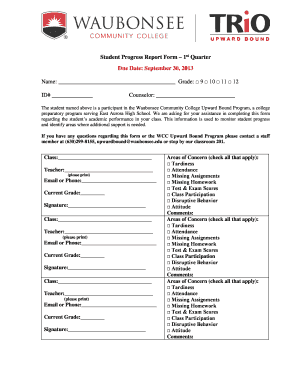
Get Student Progress Report Form - Waubonsee Community College - Waubonsee
How it works
-

Open form follow the instructions
-

Easily sign the form with your finger
-

Send filled & signed form or save
How to fill out the Student Progress Report Form - Waubonsee Community College - Waubonsee online
Completing the Student Progress Report Form is essential for monitoring academic performance for students in the Waubonsee Community College Upward Bound Program. This guide provides step-by-step instructions on how to accurately fill out the form to ensure that vital information is captured effectively.
Follow the steps to complete the Student Progress Report Form online.
- Click ‘Get Form’ button to access the report and open it in the document editor.
- Begin by filling in the student's name and grade. Select the grade level from the provided options: 9, 10, 11, or 12.
- Enter the student ID number in the designated space.
- Provide the name of the counselor overseeing the student.
- Fill in the class information, including the class title and the name of the teacher, ensuring they are printed clearly.
- In each section dedicated to different classes, repeat the process of entering class title, teacher name, current grade, and contact information.
- For each class, indicate the areas of concern by checking all applicable boxes. This includes options such as tardiness, attendance, and missing assignments.
- In the comments section, provide additional details that may help identify the student's needs and progress.
- Once all the sections are completed, save your changes. You may also download, print, or share the completed form as needed.
Complete your Student Progress Report Form online today to support student success!
This information is part of the course description in each term's Credit Course Schedule. A student must maintain a 2.0 cumulative grade point average (GPA).