Loading
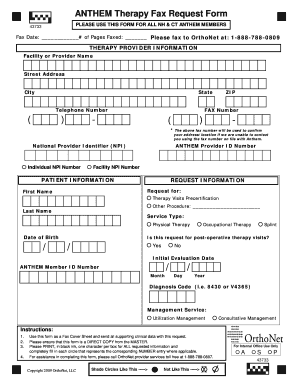
Get Anthem Therapy Fax Request Form
How it works
-

Open form follow the instructions
-

Easily sign the form with your finger
-

Send filled & signed form or save
How to fill out the Anthem Therapy Fax Request Form online
Filling out the Anthem Therapy Fax Request Form online can streamline the process of obtaining precertification for therapy services. This guide will provide you with clear and detailed instructions to help you complete the form accurately and efficiently.
Follow the steps to successfully complete the Anthem Therapy Fax Request Form.
- Click ‘Get Form’ button to obtain the Anthem Therapy Fax Request Form and open it in your preferred online editor.
- Begin by entering the fax date and total number of pages being faxed in the designated fields at the top of the form.
- Fill in the therapy provider information section. Provide the facility or provider name, street address, city, state, telephone number, ZIP code, and fax number. Note that the fax number will be used to confirm your address if necessary.
- Enter the National Provider Identifiers (NPI) where applicable. This includes both the individual NPI number and the facility NPI number.
- Proceed to the patient information section by filling in the patient's first name, last name, date of birth, and Anthem member ID number.
- Specify the request information, indicating whether it is for therapy visits precertification or other procedures. Choose the type of service: physical therapy, occupational therapy, or splint.
- Indicate if the request is for post-operative therapy visits by selecting yes or no.
- Provide the initial evaluation date and the diagnosis code in the appropriate fields.
- For the management service, select between utilization management or consultative management as applicable.
- Review all the information entered to ensure accuracy and completeness, adhering to the instructions provided in the form.
- Once all fields are completed, save the changes, download the form, print it, or share it as needed.
Complete the Anthem Therapy Fax Request Form online and ensure timely processing of your request.
By Phone: Call the number on the back of the member's ID card or dial 800-676-BLUE (2583) to speak to a Provider Service representative.